
eCommerce Keyword Research: How to Find What Your Customers Actually Search For (And What Drives Revenue)

Get weekly strategy insights by our best humans

Most eCommerce operators waste weeks hunting for keywords that will never generate a dollar of profit.
They follow the standard playbook: export thousands of keywords from Ahrefs, sort by search volume, pick the ones with "low difficulty," and hand them off to a content team. Three months later, traffic is up 40%. Revenue is flat. The founder is confused, the marketing lead is defensive, and everyone's wondering why organic search isn't working like it does for their competitors.
The problem isn't effort. It's that conventional keyword research treats all traffic equally when eCommerce businesses live and die by conversion economics. A thousand visitors searching for "best budget running shoes" matters infinitely more than ten thousand searching for "how do shoes work" — even though volume-obsessed keyword tools would suggest otherwise.
Here's what changes when you approach keyword research as an eCommerce operator instead of an SEO specialist: you stop optimizing for rankings and start optimizing for revenue systems. You treat keywords as intelligence signals that reveal what customers actually want, how they think about product categories, where competitors are vulnerable, and which parts of your catalog have commercial potential you haven't exploited yet.
This guide rebuilds eCommerce keyword research from the ground up. Not as a tactical checklist, but as a strategic diagnostic process that connects search behavior to inventory decisions, merchandising priorities, and margin management. If you've ever wondered why your keyword research produces traffic but not customers, this is the framework that fixes it.
Why does eCommerce keyword research fail for most online stores?
Walk into any eCommerce marketing meeting and ask what's driving organic strategy. You'll hear metrics like "keyword rankings," "organic traffic growth," and "search visibility." What you won't hear: "revenue per keyword cluster," "margin-weighted conversion rates," or "customer acquisition cost by search intent."
That gap — between SEO metrics and business metrics — is where most keyword research breaks down.
The "high volume = good keyword" fallacy
Search volume is a vanity metric disguised as strategic intelligence. A keyword with 10,000 monthly searches sounds more valuable than one with 500 searches until you realize the high-volume term converts at 0.2% while the low-volume term converts at 8%. For an eCommerce business with $200 average order value, that means:
- High-volume keyword: 10,000 searches × 0.2% conversion = 20 customers = $4,000 revenue
- Low-volume keyword: 500 searches × 8% conversion = 40 customers = $8,000 revenue
This isn't a contrived example. It's the fundamental dynamic of commercial intent versus informational intent. High-volume keywords are usually educational or exploratory ("what is keyword research"). Low-volume keywords are often transactional or commercially specific ("buy organic cotton bedsheets king size free shipping").
Most keyword research tools are built for publishers and content marketers who monetize through ads or affiliate links, where every pageview has roughly equal value. But in eCommerce, a single high-intent visitor is worth more than a hundred browsers. Volume-first thinking systematically misdirects your resources toward keywords that generate impressions, not purchases.
Why product-first businesses need different keyword research than publishers
Publishers succeed by covering topics comprehensively. More articles on more subjects equals more traffic equals more ad revenue. The content itself is the product, so any engaged reader has value.
eCommerce businesses are constrained by physical reality. You can only sell products you stock. You can only fulfill orders within your shipping capabilities. You can only compete on price where your margins allow it. A keyword might have perfect volume and difficulty metrics, but if it points to a product category you can't profitably serve, it's strategically worthless.
Consider an eCommerce store selling premium kitchen knives. A keyword like "best kitchen knives under $20" has significant search volume and appears targetable. But if your average knife costs $120, targeting that keyword generates traffic from people who will bounce immediately when they see your prices. You've spent resources creating content, building links, and optimizing pages for an audience that was never going to convert.
The strategic error compounds when you realize that ranking for budget-focused keywords trains Google to associate your brand with low-price shopping intent. You get more of the wrong traffic, which dilutes your site-wide conversion metrics, which makes Google less likely to rank you for the high-value keywords you actually want.
Product-first businesses need keyword research that respects their catalog architecture, pricing strategy, and operational constraints. That means filtering keywords not just by volume and difficulty, but by commercial alignment with what you actually sell and how you make money.
The hidden cost of targeting the wrong keywords (inventory, fulfillment, margin implications)
Bad keyword targeting doesn't just waste traffic — it creates operational chaos downstream.
Imagine you rank #1 for "fast shipping wireless headphones" but your fulfillment time is actually 5-7 business days. You get clicks, but you also get cart abandonment, negative reviews, and customer service burden. The keyword research succeeded at SEO but failed at business strategy.
Or suppose you target "cheap office chairs" because the volume is attractive, but your office chair margins are razor-thin and you make real money on desks and accessories. You drive a surge of chair traffic that doesn't cross-sell well, your site-wide average order value drops, and your customer acquisition cost becomes unsustainable. The keyword research delivered traffic but destroyed unit economics.
These failures happen because conventional keyword research stops at the SERP. It asks "can we rank?" instead of "should we rank?" An eCommerce operator doing strategic keyword research asks different questions:
- If we rank for this keyword, what product will we send them to?
- What's the margin on that product, and what AOV can we reasonably expect?
- Does this keyword attract customers likely to make repeat purchases, or one-time bargain hunters?
- If this keyword drives significant traffic, can our inventory support it without stockouts?
- Does this keyword cannibalize demand for higher-margin products we'd prefer to sell?
These aren't optional considerations. They're the difference between keyword research that drives revenue and keyword research that drives traffic you can't monetize.
What makes eCommerce keyword research different from content SEO?
Content marketers and eCommerce operators use the same tools but they're playing different games. A content site wins by matching information needs. An eCommerce site wins by matching purchase intent to product availability. That structural difference reshapes everything about how keyword research works.
Commercial intent vs. informational intent — and why eCommerce blurs the line
The traditional intent taxonomy (informational, navigational, transactional) collapses under eCommerce complexity.
Someone searching "how to choose running shoes" has informational intent by conventional classification. But if they're searching that phrase on a Monday afternoon and they land on a running shoe store's buying guide that includes product recommendations, there's a 15-20% chance they'll purchase within 48 hours. That's not pure information-seeking behavior. It's research within a buying cycle.
Conversely, someone searching "buy Nike Air Max 270" has obvious transactional intent, but if they're just price-comparing across ten tabs and have no brand loyalty, their commercial value might be lower than the "informational" searcher who's actually ready to trust a recommendation.
eCommerce keyword research has to account for commercial intent — the likelihood that a search query represents someone in an active buying cycle with budget allocated and decision criteria firming up. Commercial intent is higher for:
- Specific product model numbers or SKUs
- Searches that include purchase qualifiers ("near me," "in stock," "same day delivery")
- Comparison queries that mention multiple brands or products
- Problem-solution searches where your product is the solution ("eliminate pet odor from carpet")
- Feature-specific searches that indicate informed buying criteria ("laptops with 32GB RAM under $1500")
Commercial intent is lower for:
- Broad category education ("what is SEO")
- Entertainment or inspiration browsing ("cool gadgets")
- Homework or academic research
- Aspirational searches with no immediate purchase timeline ("dream kitchen design")
The strategic implication: eCommerce keyword research should weight commercial intent heavier than search volume. A keyword with 500 monthly searches and 70% commercial intent is more valuable than a keyword with 5,000 searches and 5% commercial intent — because the smaller keyword represents 350 potential buyers while the larger keyword represents 250 potential buyers buried in 4,750 browsers.
Understanding this dynamic transforms how you build your search intent mapping framework for eCommerce catalogs.
How product entities and category entities shape topical authority
Here's where eCommerce keyword research diverges completely from content SEO: your topical authority isn't built through comprehensive topic coverage. It's built through catalog coherence and category depth.
A content site gains authority by publishing exhaustively on a subject. An eCommerce site gains authority by demonstrating deep inventory, expert merchandising, and semantic relationships between products.
Think about how Google understands entities in eCommerce contexts:
- Product entities: Specific SKUs, models, brands ("iPhone 15 Pro Max," "Vitamix 5200")
- Category entities: Product types and taxonomies ("blenders," "high-performance blenders," "professional blenders")
- Attribute entities: Features, specifications, use cases ("BPA-free blender," "blender for smoothies," "blender with tamper")
- Brand entities: Manufacturers and their relationships to categories ("Vitamix," "Blendtec")
Your keyword research needs to map to this entity hierarchy because that's how Google evaluates your authority. If you have 50 blenders in stock and robust product data for each one, detailed category pages that explain different blender types, comparison content that helps customers choose, and rich attribute filtering, Google recognizes you as a blender authority. Your category pages rank for competitive head terms. Your product pages rank for long-tail specific searches. Your buying guides rank for informational queries that convert into transactions.
But if you have 3 blenders in stock and you're trying to rank for every blender-related keyword through blog content, Google sees a gap between your claimed expertise and your actual catalog depth. You're a publisher writing about blenders, not a store selling them. That distinction determines what keywords Google will actually rank you for.
The entity-first SEO approach means organizing your keyword research around:
- Core category entities you can dominate — where your catalog is deep enough to be authoritative
- Product entities you stock — specific models and variations
- Attribute entities that differentiate your selection — the specific features and use cases your products serve
- Adjacent category entities for expansion — where your catalog could credibly grow
This creates a keyword research framework that respects your operational reality while identifying genuine growth opportunities.
The role of transactional keywords in your site architecture
Transactional keywords — searches with clear purchase intent — are the most valuable keywords in eCommerce. But they're also the most structurally constrained.
Every transactional keyword has to map to a specific page type:
- Product-specific transactional keywords → Product detail pages ("buy iPhone 15 Pro 256GB," "Patagonia Nano Puff jacket sale")
- Category transactional keywords → Category or collection pages ("buy running shoes online," "women's winter coats")
- Brand + category transactional keywords → Brand collection pages or filtered category views ("Nike running shoes," "Levi's jeans 501")
- Comparative transactional keywords → Comparison pages or buying guides ("best espresso machine under $500," "Vitamix vs Blendtec")
Your site architecture determines which of these keywords you can realistically target. If you have 200 products but no robust category pages, you can target product-specific keywords but you can't compete for category head terms. If you have great category pages but weak product data, you might rank for broad categories but lose conversions when customers click through to thin product pages.
Strategic keyword research for eCommerce starts with an architectural audit:
- What page types do we have, and what's their current quality?
- Which transactional keyword types can our architecture support?
- Where are the structural gaps preventing us from targeting valuable keywords?
- What's the minimum investment required to make specific page types competitive?
This exercise often reveals that the highest-value keyword opportunities require architectural changes, not just content creation. You can't keyword-research your way around a site architecture that doesn't support commercial intent.
Why your keyword strategy must match your catalog structure (and inventory reality)
The most common eCommerce keyword research mistake is targeting keywords for products you can't reliably keep in stock.
Imagine you identify "organic baby clothes" as a high-value keyword. You optimize a category page, build links, start ranking in positions 3-5. Traffic increases. Then:
- Week 1: Half your organic baby clothes sell out
- Week 2: You temporarily redirect the category page to a broader "baby clothes" page
- Week 3: You restock and republish the original page
- Week 4: A different set of products sell out
Google sees this volatility and interprets it as poor user experience. Your rankings erode. Your work was technically correct but operationally unsustainable.
Sustainable keyword strategy requires catalog-aware prioritization:
Evergreen products (always in stock, reorderable) → Target aggressively with category and product keywords. These are your foundation.
Seasonal products (predictable availability windows) → Target with seasonal keyword campaigns that you activate and pause in sync with inventory. Don't maintain year-round pages for products you stock 3 months per year.
Limited-run or exclusive products → Use for brand differentiation and link building, but don't anchor your keyword strategy here. When they sell out, they're gone.
High-turnover products (fashion, trend-driven) → Build category authority instead of product-specific optimization. Your category pages persist even as individual products cycle through.
Custom or made-to-order products → Often have the best margins but the worst keyword targeting opportunities. Focus on problem-solution keywords and design consultation content that drives inbound inquiries.
This inventory-aware approach connects keyword research to merchandising strategy. You're not just finding keywords; you're identifying which parts of your catalog can sustainably generate organic traffic and revenue.
How do you identify keywords that actually drive eCommerce revenue?
Most keyword research starts with tools and ends with spreadsheets. Strategic keyword research starts with customer behavior and ends with revenue attribution.
Start with product entities, not keyword tools
The biggest methodological error in eCommerce keyword research is opening Ahrefs before you understand your own catalog.
Before you touch a keyword tool, inventory your product entities:
- List every distinct product or product line you sell. Not just SKUs — actual customer-facing product concepts. If you sell 12 sizes of the same T-shirt, that's one product entity, not twelve.
- Map your category hierarchy. How do you organize products for customers? What are the parent categories, subcategories, and attribute filters? This taxonomy becomes your semantic keyword structure.
- Identify your hero products. Which 20% of products generate 80% of revenue? These products deserve individual keyword strategies. The long tail can be served by category and attribute pages.
- Document product attributes that matter to customers. Material, size, color, feature specifications, use cases, compatibility — anything customers filter or search by.
- Note inventory depth and margins. Which categories are you strongest in? Where do you have competitive product selection? Where are margins highest?
This product entity inventory becomes your keyword research scaffold. Now when you use keyword tools, you're not drowning in generic data. You're asking specific questions:
- What do people search for when they want this specific product?
- What category terms drive traffic to this product type?
- What attributes do searchers care about in this category?
- What problems does this product solve, and how do people search for those solutions?
Starting with product entities keeps your keyword research commercially grounded. You're not chasing keywords that happen to have good metrics. You're identifying search demand that maps to products you can actually fulfill profitably.
Mapping customer journey stages to search intent types
eCommerce purchases don't happen in one search session. Customers research, compare, deliberate, and then — sometimes days or weeks later — convert.
Strategic keyword research accounts for the full journey:
Awareness stage (Problem recognition):
- Search intent: Informational, exploratory
- Example keywords: "why does my back hurt when I sit," "how to improve home office ergonomics"
- Page types: Blog posts, guides, educational content
- Conversion goal: Email capture, return visits, brand recall
- Revenue attribution: Assisted conversions, typically 5-30 day window
Consideration stage (Solution evaluation):
- Search intent: Comparative, educational with commercial undertones
- Example keywords: "best ergonomic office chairs," "standing desk vs ergonomic chair," "ergonomic chair buyer's guide"
- Page types: Buying guides, comparison pages, category overviews
- Conversion goal: Category page visits, product browsing
- Revenue attribution: Shorter window, 1-14 days
Decision stage (Purchase readiness):
- Search intent: Transactional, specific
- Example keywords: "Herman Miller Aeron size B sale," "buy Steelcase Leap chair," "ergonomic chair free shipping"
- Page types: Product pages, filtered category views
- Conversion goal: Direct purchase
- Revenue attribution: Same session or 1-3 days
Most eCommerce keyword research over-indexes on decision-stage keywords because they're easiest to attribute. But the reality is that 60-70% of your eventual customers will interact with awareness or consideration content before they search with purchase intent.
The strategic framework: allocate keyword targeting across all three stages, weighted by your customer acquisition model:
- High-consideration purchases (furniture, electronics, B2B): Heavy investment in awareness and consideration keywords, because your customers research extensively
- Impulse or replacement purchases (consumables, fashion accessories): Focus on decision keywords, because the research cycle is short
- Repeat purchase products (subscription, consumables): Invest in awareness content that builds brand preference for the next buying cycle
This journey-aware approach to keyword research connects to your broader content architecture, ensuring that each keyword target serves a strategic purpose in your customer acquisition system.
Using site search data as zero-cost keyword intelligence
Your site search bar is a direct line to customer intent, and most eCommerce operators ignore it.
Every search query entered into your site represents someone who:
- Made it to your site (so there's baseline interest)
- Couldn't immediately find what they wanted (so your navigation or merchandising has a gap)
- Told you exactly what they're looking for (in their own words, not SEO jargon)
Site search data reveals three types of keyword opportunities:
Product gaps: Searches for products you don't carry. If 200 people per month search for "vegan protein powder" on your supplement site and you don't stock it, that's a merchandising signal before it's an SEO signal. But once you add the product, you know there's organic search demand you can target.
Navigation failures: High-volume site searches for products you do carry indicate that your category structure or internal linking isn't surfacing these products effectively. Fix the navigation first, then optimize the category page for external search.
Language mismatches: Customers might search for "running shoes for plantar fasciitis" while your category is labeled "stability running shoes." That language gap tells you which keywords to target and how to adjust your product descriptions and metadata.
To extract keyword research value from site search:
- Export your site search queries (Google Analytics 4, Shopify analytics, or your eCommerce platform's native reporting)
- Filter out navigational queries (brand names, known product names, competitor products you don't stock)
- Look for patterns in the remaining searches: What categories have the most search volume? What attributes do customers search by? What problems are they trying to solve?
- Cross-reference with actual keyword volume tools: Not every site search query has meaningful external search volume, but when there's alignment, you've found a proven-intent keyword
- Prioritize based on conversion data: Which site searches lead to purchases? Those searchers represent your ideal audience — target the external keywords they would have used to find you
Site search analysis typically surfaces 10-20 high-value keywords that traditional research misses entirely, because they're too specific, too colloquial, or too new to have significant tool data yet. These are often your highest-converting keywords once you optimize for them.
How to analyze competitor product catalogs for keyword gaps
Competitor keyword analysis in eCommerce isn't about stealing their keywords. It's about finding products they stock that you don't, categories they dominate that you could compete in, and positioning angles they've missed.
The process:
Step 1: Identify your true competitors in search. Don't assume your business competitors are your SEO competitors. The site that outranks you for "ergonomic office chairs" might be a review site, a marketplace, or a publisher — not a direct eCommerce competitor. Use Ahrefs or Semrush to see who actually ranks for your target keywords.
Step 2: Crawl their product catalog. Tools like Screaming Frog or Sitebulb can crawl competitor sites and extract their product URLs, category structures, and page titles. This gives you a map of their catalog without manually browsing thousands of pages.
Step 3: Compare category coverage. Where do they have deep inventory that you lack? If a competitor has 200 running shoes and you have 15, you probably can't compete for "buy running shoes online." But if they're weak in trail running shoes specifically and that's where your inventory is strongest, you've found a category gap.
Step 4: Analyze their ranking keywords. Export their top organic keywords from Ahrefs/Semrush. Filter for product and category keywords (exclude blog/informational content). Look for patterns:
- Keywords they rank for that you don't target at all (product gaps)
- Keywords where they rank #1-3 and you rank #15-30 (winnable with optimization)
- Keywords they rank for with weak content (opportunity to outcompete with better product data or UX)
Step 5: Examine their content strategy. What informational keywords do they target? Do they have buying guides, comparison pages, how-to content? If they rank well for "[product type] buying guide" and you don't have an equivalent page, that's a content gap that likely drives assisted conversions.
Step 6: Assess their product data quality. Scrape some sample product pages. How detailed are their descriptions? How many product images? Customer reviews? Rich specification tables? If their product data is thin, you can outrank them by providing more comprehensive, helpful product information — even if their domain authority is higher.
The output of this analysis isn't a list of keywords to copy. It's a strategic map:
- Where you can win now: Keywords where you have comparable inventory and better content/UX
- Where you can win with investment: Categories where modest product expansion would make you competitive
- Where you shouldn't compete: Keywords dominated by competitors with structural advantages (Amazon, big-box retailers with unlimited inventory)
- Where they're vulnerable: Product categories or keyword angles they've neglected despite having the inventory to compete
This competitive intelligence shapes your keyword prioritization, your merchandising roadmap, and your content strategy.
The margin-weighted priority score (volume × difficulty × AOV × margin)
Standard keyword research prioritizes based on volume and difficulty. That works for publishers. For eCommerce, it's strategically incomplete.
The margin-weighted priority score adds commercial reality:
Formula: Priority Score = (Monthly Search Volume × Click-Through Rate %) × (100 - Keyword Difficulty) × Expected AOV × Gross Margin %
Why each component matters:
Search Volume × CTR: Raw volume overstates value. The #1 position gets ~30% CTR, position #5 gets ~5%. If you can't realistically rank top 3, adjust expected traffic accordingly.
100 - Keyword Difficulty: Inverted so that easier keywords score higher. A keyword with difficulty 20 scores 80, while difficulty 70 scores 30.
Expected AOV: Not all product keywords have the same transaction value. "Buy laptop" might have $1,200 AOV while "buy phone case" has $25 AOV.
Gross Margin %: A 40% margin product is worth more than a 10% margin product, even at the same AOV. This factor ensures you prioritize keywords that drive profitable revenue, not just revenue.
Example comparison:
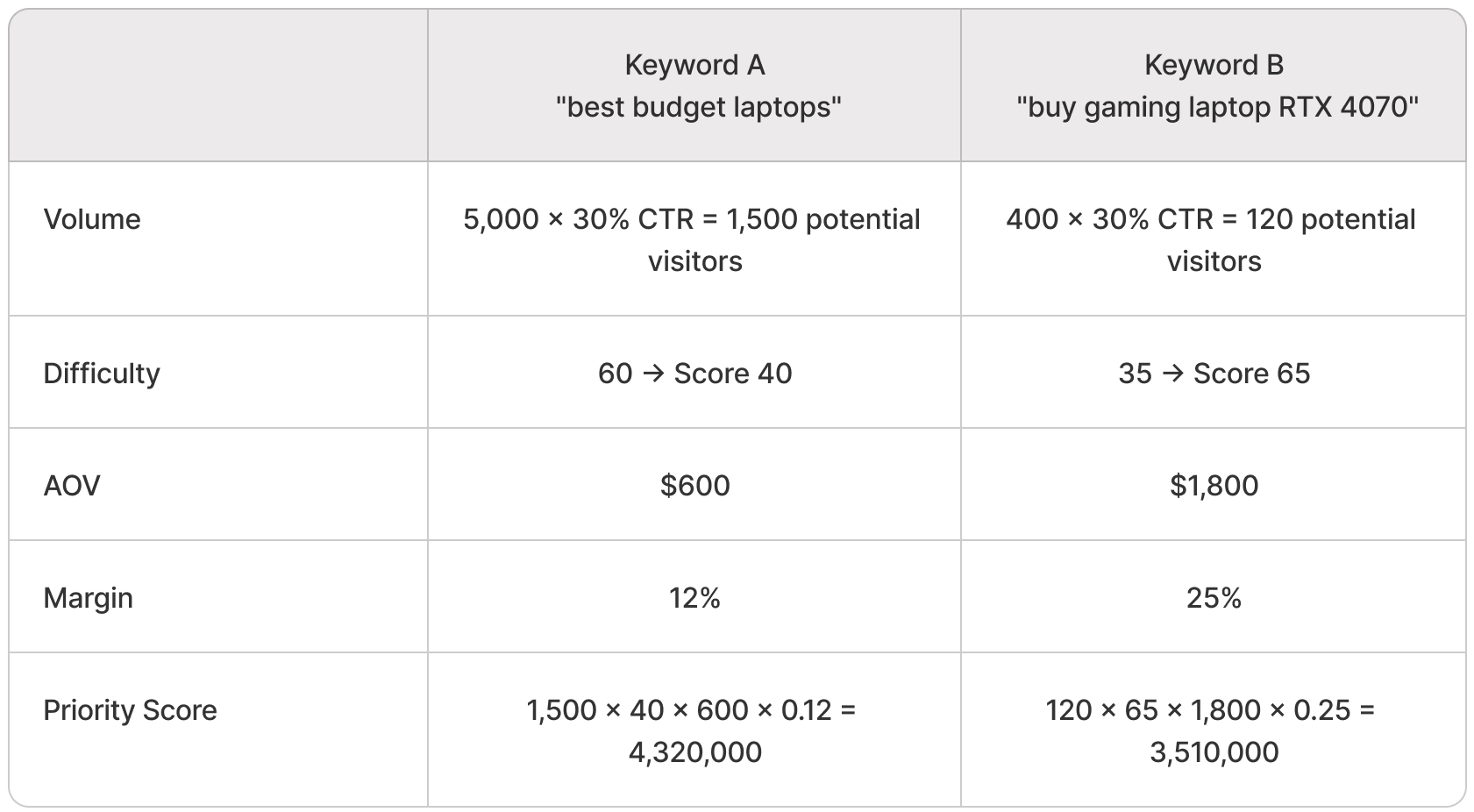
Despite 12× lower search volume, Keyword B scores nearly as high because it targets higher-value products with better margins and lower competition.
This margin-weighted approach prevents the common mistake of targeting high-volume, low-margin keywords that generate traffic but destroy profitability. It's how you build keyword strategies that align with business economics, not just SEO metrics.
Which keyword research tools actually matter for eCommerce operators?
The keyword tool landscape is crowded, expensive, and mostly designed for agencies and publishers. eCommerce operators need a smaller, more strategic toolkit.
What to look for in an eCommerce keyword research tool
Before evaluating specific tools, define your requirements:
Must-haves:
- Competitor domain analysis: Ability to see what keywords drive traffic to competitor sites
- Product-specific keyword suggestions: Not just blog topics, but actual product and category keywords
- Search volume with commercial intent indicators: Volume alone is useless; you need conversion probability
- Ranking difficulty estimates: Ideally based on domain authority, backlink profiles, and content quality
- SERP feature identification: Knowledge of whether a keyword triggers shopping ads, product carousels, or featured snippets that will cannibalize your organic clicks
Nice-to-haves:
- Historical trend data: Seasonal patterns, year-over-year growth/decline
- Question extraction: "People also ask" and related questions for content ideation
- API access: If you're managing a large catalog and need to automate keyword mapping
- Localization: If you operate in multiple geographic markets
Irrelevant features for most eCommerce operators:
- Content ideation and AI writing (you're optimizing product pages, not creating blog farms)
- Social media monitoring (different use case)
- Rank tracking for thousands of keywords (focus on revenue-driving clusters, not vanity metrics)
Most operators overpay for enterprise SEO suites when they need 20% of the features. Better to master a focused toolkit than drown in feature bloat.
Google Search Console and Google Analytics — the baseline (and why they're underused)
The most valuable keyword data you have is free, and most eCommerce operators barely look at it.
Google Search Console tells you:
- Which keywords already drive impressions and clicks to your site
- Where you rank positions 8-20 (optimization opportunities — you're close but not winning)
- Which pages are underperforming relative to impressions (CTR improvement targets)
- What queries trigger your product schema or shopping features
- Mobile vs. desktop search behavior differences
Strategic applications for eCommerce:
Identify quick wins: Filter for keywords where you rank positions 4-10 with decent impressions but low CTR. Improving title tags, meta descriptions, or adding product schema can move you into the top 3 without additional content or links.
Discover long-tail product keywords: Sort by impressions, look for product-specific queries you didn't know you were ranking for. These often have zero volume in keyword tools because they're too specific, but they convert at high rates.
Catch cannibalization issues: If multiple URLs on your site rank for the same keyword, GSC will show you. This is common in eCommerce when product variants, category pages, and filtered views compete with each other.
Track seasonal patterns: Year-over-year comparison in GSC reveals which product categories have seasonal search demand, informing inventory planning and promotion timing.
Google Analytics (GA4) tells you:
- Which organic keywords drive revenue (not just traffic)
- Average order value by landing page (proxy for keyword value)
- Assisted conversion paths (which informational pages contribute to later purchases)
- Site search behavior after organic landing (indicates intent-match failures)
- Session quality metrics by traffic source and keyword cluster
Strategic applications:
Revenue attribution by keyword cluster: Tag your landing pages by keyword intent (awareness, consideration, decision) and track conversion rates and revenue by cluster. This tells you which keyword types actually make money.
Identify content gaps: Look at high-exit-rate product pages that receive organic traffic. If people land and immediately leave, either the keyword intent doesn't match the page, or the page doesn't answer their questions. Check site search data from those sessions to see what they were looking for.
Measure keyword influence on repeat purchases: For subscription or repeat-purchase businesses, track which organic keywords drive the highest lifetime value customers. These are worth disproportionate investment even if initial conversion rates look similar.
The strategic advantage of GSC and GA4: they show actual behavior, not projected estimates. Keyword tools predict volume and difficulty. GSC and GA4 show you what's already working (or failing) in your specific context.
When Ahrefs and Semrush are worth the investment
Ahrefs and Semrush are the industry-standard keyword research platforms, and they're expensive ($100-$400/month depending on tier). For eCommerce operators, they're worth it when:
You're in competitive categories: If you're selling products that every major retailer carries (electronics, supplements, fashion basics), you need deep competitor intelligence to find positioning angles. Ahrefs and Semrush show you exactly what keywords drive traffic to competitors, what content they rank for, and where they're vulnerable.
You have content marketing budget: If you're investing in buying guides, comparison pages, and educational content to drive assisted conversions, these tools help you identify which content keywords have commercial value vs. which are pure traffic plays with no eCommerce upside.
You're expanding into new product categories: Before investing in new inventory, use these tools to assess keyword demand, competitive intensity, and commercial intent patterns. It's product market research disguised as SEO research.
You're fighting keyword cannibalization: Both tools offer site audit features that identify structural SEO issues, including internal competition between pages. For large catalogs (1,000+ SKUs), this is essential.
You're building links strategically: Ahrefs and Semrush show you competitors' backlink profiles, helping you identify link building opportunities. For eCommerce, this means finding product review sites, gift guides, and roundups where you should pitch inclusion.
When you probably don't need them:
- You have <100 SKUs and a simple catalog structure
- You're in a niche category where there's limited search volume anyway
- Your primary traffic driver is paid search or social, not organic
- You haven't maxed out the strategic value of GSC and GA4 yet
A common middle-ground approach: Subscribe to Ahrefs or Semrush for 1-2 months per year to do deep competitive research and keyword planning, then cancel until the next annual review. You don't need real-time data for strategic keyword research.
Google Keyword Planner for eCommerce — limitations and use cases
Google Keyword Planner is free (requires Google Ads account), and it has one massive advantage over third-party tools: it's Google's actual data.
What it's good for:
Search volume validation: Third-party tools estimate volume based on clickstream data and models. Keyword Planner shows you Google's internal volume ranges. It's less precise but more trustworthy.
Local and geographic segmentation: If you serve multiple regions or countries, Keyword Planner lets you segment search volume by location more reliably than most tools.
Commercial intent signals: Because it's designed for Google Ads, Keyword Planner shows you which keywords have high advertiser competition. That's a proxy for commercial intent — if people are paying $5/click, there's money in that keyword.
Seasonal forecasting: The historical trends and forecast features help you anticipate inventory needs based on search patterns.
What it's bad for:
Difficulty assessment: Keyword Planner doesn't estimate organic ranking difficulty because it's built for paid search.
Competitor analysis: No domain-level insights, no way to see what competitors rank for.
Long-tail discovery: It aggregates low-volume keywords into ranges (10-100, 100-1K) rather than showing specific search volumes, making it hard to prioritize niche terms.
Content ideation: Doesn't extract questions or show SERP features.
Strategic use case: Use Keyword Planner to validate volume estimates from Ahrefs/Semrush, especially for product-specific keywords where you suspect the third-party data is unreliable. Also use it to cross-check commercial intent — if a keyword has high volume but no Ads competition in Keyword Planner, it might be informational traffic disguised as commercial.
Platform-specific tools (Shopify analytics, WooCommerce search data)
Your eCommerce platform collects keyword-relevant data most operators ignore.
Shopify Analytics:
- Top landing pages by organic traffic (which product/category pages are winning?)
- Conversion rate by landing page (which organic entry points drive purchases?)
- Average order value by referrer (which organic sources drive high-value customers?)
- Product view reports (which products get traffic but don't convert? Intent mismatch or product issue?)
WooCommerce:
- Product search widget data (if you use plugins like SearchWP or Relevanssi)
- Cart abandonment by traffic source (do organic visitors abandon at higher rates than other channels?)
- Category navigation paths (how do organic visitors browse after landing?)
BigCommerce, Magento, others: Most platforms offer similar analytics within their dashboards, though the granularity varies.
Why this matters: Platform analytics connect keyword performance directly to revenue in a closed-loop system. You don't need to wrestle with GA4 attribution models or rely on estimates. You can see exactly which organic landing pages drive which products into which carts, and what the outcome is.
The strategic application: After identifying target keywords in Ahrefs/Semrush, validate them against your platform's actual conversion data. A keyword might look perfect in a tool, but if similar keywords historically convert poorly on your site, that's a signal that your catalog or positioning doesn't match what searchers want.
How do you organize keywords for category pages, product pages, and content?
Keyword research produces lists. Keyword strategy produces architecture. The difference is understanding which keywords map to which page types and how those pages support each other.
The entity hierarchy: category entities → product entities → feature entities
eCommerce sites have three distinct entity layers, and each layer targets different keyword types:
Category entities (top level):
- Broad product categories and taxonomies
- Example: "Running Shoes," "Kitchen Blenders," "Office Chairs"
- Keyword targets: High-volume, competitive category terms
- Page types: Main category pages, collection pages
- SEO goal: Capture top-of-funnel traffic, establish topical authority
Product entities (middle level):
- Specific products, brands, models
- Example: "Nike Pegasus 40," "Vitamix 5200," "Herman Miller Aeron"
- Keyword targets: Brand + model, specific product searches
- Page types: Product detail pages (PDPs)
- SEO goal: Capture bottom-funnel purchase intent
Feature/attribute entities (supporting level):
- Specifications, use cases, solutions
- Example: "Waterproof Running Shoes," "Blender with Tamper," "Ergonomic Chair for Short Person"
- Keyword targets: Long-tail attribute searches, problem-solution queries
- Page types: Filtered category views, landing pages, buying guides
- SEO goal: Capture mid-funnel consideration traffic
Most eCommerce sites fail at keyword organization because they try to target all three entity layers on the same page type. A product page tries to rank for the category term. A category page tries to rank for specific models. This creates weak signals across the board instead of strong signals per entity layer.
The strategic framework:
- Map your keyword research to entity hierarchy first, page types second. Don't ask "what keywords should this page target?" Ask "what entity does this page represent, and what keywords naturally align with that entity?"
- Ensure architectural completeness. If you have 200 products but only 3 category pages, you're missing the middle layer. If you have great categories and products but no attribute-filtered pages, you can't capture feature-specific searches.
- Build semantic relationships through internal linking. Category pages should link to relevant products. Product pages should link to related categories and to other products (accessories, alternatives). Filtered attribute pages should link to the parent category and to specific products that match the filter.
- Don't force keywords onto wrong page types. If a keyword is clearly a product-level search and you don't carry that product, don't try to rank your category page for it. That's a product gap, not an SEO opportunity.
This entity-first approach ensures that your keyword targets support your site architecture instead of fighting against it.
Keyword clustering for collection pages and category pages
Category pages serve two strategic functions: they aggregate products in commercially logical ways, and they're your primary vehicle for ranking for high-volume category keywords.
Keyword clustering helps you determine:
- What categories you need
- How to organize subcategories
- What on-page elements to optimize
- Which internal links to prioritize
The clustering process:
Step 1: Group keywords by commercial intent and product type. Take all your category-level keywords and cluster them by:
- Exact product match (all keywords asking for the same thing)
- User intent (buying, comparing, researching)
- Specificity level (broad category vs. niche subcategory)
Example for "Running Shoes":
- Cluster 1 (Broad): "running shoes," "buy running shoes," "running shoes online"
- Cluster 2 (Trail): "trail running shoes," "waterproof trail running shoes," "best trail runners"
- Cluster 3 (Road): "road running shoes," "cushioned running shoes," "marathon running shoes"
- Cluster 4 (Brand-specific): "Nike running shoes," "Brooks running shoes"
Step 2: Map clusters to existing or needed category pages.
- Cluster 1 → Main "Running Shoes" category page
- Clusters 2-3 → Subcategory pages ("Trail Running Shoes," "Road Running Shoes")
- Cluster 4 → Brand collection pages or filtered views
Step 3: Identify the primary keyword per cluster. This becomes your H1, title tag, and URL slug. Supporting keywords in the cluster inform your on-page copy, H2s, and metadata.
Step 4: Validate against search volume and competition. If a keyword cluster has 50 related searches but total monthly volume under 100, it probably doesn't merit a dedicated category page. Combine it with a larger cluster or serve it through filtered views.
Step 5: Check for keyword cannibalization. If multiple clusters could reasonably target the same primary keyword, you need to differentiate. Either create distinctly different page experiences (Trail vs. Road running shoes) or consolidate into one page and use filtering to serve sub-intents.
This clustering discipline prevents the common eCommerce mistake of creating dozens of thin category pages that cannibalize each other. Better to have 10 strong, keyword-focused category pages than 50 weak ones competing for the same terms.
When to target product-specific keywords vs. generic category terms
Product-specific keywords are easier to rank for (lower competition) but have lower volume. Category keywords have high volume but intense competition. The strategic question: where do you invest?
Target product-specific keywords when:
You stock exclusive or hard-to-find products: If you're the only retailer with a specific product or brand, you can dominate those keywords with minimal effort.
You have strong product content: Detailed descriptions, multiple images, customer reviews, video demos, spec sheets — these signals help PDPs rank even in competitive categories.
The product has brand loyalty or specific search demand: People search for "Patagonia Nano Puff jacket" more than "lightweight insulated jacket." If your products have brand recognition, product-specific keywords are high-intent.
Your catalog is deep but category competition is brutal: If you can't compete with Amazon and Walmart for "running shoes," but you have 50 running shoe models, target those model-specific keywords instead.
Target generic category keywords when:
You have inventory depth in the category: Google rewards category authority. If you have 200 running shoes with rich product data, you can compete for "running shoes." If you have 8, you can't.
Your brand is differentiated in the category: If you're the "sustainable running shoe specialist" or "trail running expert," you can carve out category keyword space through positioning.
The category has clear subcategories you can dominate: You might not rank for "running shoes," but you could own "minimalist running shoes" or "running shoes for wide feet."
Category traffic has strong assisted conversion value: Even if category visitors don't buy immediately, if they browse, subscribe, or return later to purchase, category keywords are worth targeting for long-term value.
The strategic balance:
Most eCommerce sites should target:
- 60-70% product-specific and long-tail keywords (easier wins, faster revenue)
- 20-30% mid-tier category and attribute keywords (moderate competition, building authority)
- 10-20% high-volume category head terms (long-term brand building, likely won't see results for 12+ months)
Don't abandon category keywords just because they're hard. But don't make them your primary strategy if you don't have the catalog depth and domain authority to compete.
How to handle keyword cannibalization in eCommerce (faceted navigation, product variants)
Keyword cannibalization happens when multiple pages on your site compete for the same keyword, diluting your ranking potential. In eCommerce, it's structurally inevitable because of:
Product variants: You sell the same T-shirt in 5 colors and 6 sizes. That's potentially 30 URLs that Google could see as duplicate or competing.
Faceted navigation: Your "Running Shoes" category page has filterable attributes (brand, size, color, price range). Each filter combination creates a new URL. Now you have hundreds of URLs that all target "running shoes" or slight variations.
Multiple category paths: A product might appear in "Women's Shoes" and "Running Shoes" and "Nike Products." Three different URLs, same product.
Strategies to prevent or resolve cannibalization:
1. Canonical tags for variants and filters Set your primary category page (e.g., /running-shoes) as the canonical, and mark all filtered views (e.g., /running-shoes?brand=nike&color=blue) as canonicalized to the main page. This tells Google to consolidate ranking signals.
2. Noindex filtered pages with low value If a filtered combination is unlikely to be searched for directly ("blue Nike running shoes in size 8.5"), noindex it. Only allow indexing of filtered pages that represent real search demand.
3. Consolidate product variants into a single PDP Instead of separate URLs for each color/size, use a single product page with variant selectors. This concentrates link equity and authority.
4. Use breadcrumb navigation to establish primary category If a product appears in multiple categories, use breadcrumb schema to signal which category is primary. This helps Google understand your intended hierarchy.
5. Internal linking structure reinforces priority Link to the page you want to rank most prominently from your homepage, main navigation, and high-authority pages. Pages buried 3-4 clicks deep won't rank as well even if they technically target the keyword.
6. Strategic use of rel="prev" and rel="next" for pagination For paginated category pages, use pagination tags to tell Google these are sequential pages of the same entity, not separate pages competing for the keyword.
The key insight: keyword cannibalization in eCommerce isn't just an SEO problem. It's an information architecture problem. Fix the IA, and the SEO resolves.
Using long-tail keywords for informational content that drives assisted conversions
Long-tail keywords—specific, lower-volume searches—are where most eCommerce operators find their highest-ROI opportunities. But they require content strategy, not just product pages.
The long-tail advantage:
Lower competition: "Best running shoes" has keyword difficulty 75+. "Best running shoes for plantar fasciitis on concrete" has difficulty 25.
Higher intent specificity: Long-tail searchers know what they want. They're further down the research path.
Assisted conversion potential: Someone searching "how to choose running shoes for plantar fasciitis" might not buy today, but they're in an active research cycle. Answer their question comprehensively, and you're on their shortlist.
Voice search and natural language: As voice search grows, queries become more conversational and long-tail. Optimizing for these patterns future-proofs your keyword strategy.
Content types that target long-tail keywords:
Problem-solution guides: "How to [solve problem] with [product category]"
- Example: "How to reduce back pain with an ergonomic office chair"
- Conversion path: Guide → Recommended products → Category page
Comparison pages: "[Product A] vs [Product B]" or "Best [product type] for [specific use case]"
- Example: "Vitamix 5200 vs 7500" or "Best blenders for green smoothies"
- Conversion path: Comparison → Winner recommendation → Product page
Buyer's guides: "How to choose [product category]"
- Example: "How to choose running shoes for your foot type"
- Conversion path: Education → Category page with filtering guidance
Use case pages: "[Product category] for [specific situation]"
- Example: "Running shoes for overpronators with wide feet"
- Conversion path: Use case → Filtered category view → Product selection
Integration with product pages:
Long-tail content shouldn't exist in isolation. Every piece of informational content should:
- Link to relevant category pages
- Include product recommendations where contextually appropriate
- Capture email for remarketing if the visitor doesn't convert immediately
- Track assisted conversions in GA4 to measure true value
The product-led content approach ensures that your long-tail keyword strategy generates revenue, not just traffic that bounces.
How do you prioritize keywords when you can't target everything?
Every eCommerce business faces resource constraints. You have limited development time, limited content budget, limited link building capacity. Strategic prioritization is what separates operators who build sustainable organic growth from those who chase every shiny keyword.
The 80/20 of eCommerce keywords — where most revenue actually comes from
The Pareto principle applies viciously in eCommerce keyword strategy: 20% of your keywords will drive 80% of your organic revenue.
The question is: which 20%?
Revenue concentration patterns in eCommerce:
Brand keywords: If you have any brand recognition, branded searches ("your brand name" + "product category") typically have 40-60% conversion rates. These are your highest-value keywords even if volume is low.
Bottom-funnel product-specific keywords: "Buy [specific product model]" converts at 10-20× the rate of "best [product category]."
Problem-solution keywords that match your differentiation: If you're the specialist in sustainable fashion, "sustainable [product type]" keywords drive disproportionate value even if they're niche.
Repeat-customer keywords: For consumables or subscription products, keywords like "buy [product] again" or "[brand] reorder" represent high-LTV customers.
How to identify your 20%:
- Export all organic keywords from GSC that drove conversions in the last 12 months.
- Calculate revenue per keyword (or use GA4's enhanced ecommerce reporting if properly configured).
- Sort by revenue, not traffic.
- Identify the keyword clusters that represent the top 20% of revenue.
- Audit current rankings: Are you #1 for these keywords? If not, that's your highest-priority optimization work. Are you already #1? Then prioritize link building to defend those positions.
The strategic implication: Spend 60% of your keyword optimization effort defending and strengthening your top 20%. Only spend 40% on expansion and new keyword targets. Most operators do the opposite—neglecting their revenue-driving keywords while chasing new opportunities.
Seasonal vs. evergreen keyword prioritization
eCommerce businesses live and die by seasonality. Keyword strategy must account for it.
Seasonal keywords (holiday gifts, summer clothing, back-to-school, tax season products):
- High volume during peak season, near-zero off-season
- Competitive during season, easier to build authority off-season
- Require lead time (start optimizing 3-4 months before season)
Evergreen keywords (staple products, year-round needs):
- Consistent volume with predictable fluctuations
- Harder to break into (competitors have been optimizing for years)
- Compound value over time (rank once, benefit indefinitely)
The prioritization framework:
Q1 (January-March): Optimize for next holiday season. Build content and links for Q4 seasonal keywords while competition is low. Refresh evergreen category pages that slipped in rankings.
Q2 (April-June): Focus on summer seasonal keywords. Begin building content for back-to-school if relevant. Continue evergreen strengthening.
Q3 (July-September): Finish summer seasonal optimization. Shift to holiday prep (new products, gift guides, holiday-specific pages). Don't start new evergreen initiatives—protect time for Q4 execution.
Q4 (October-December): Execute seasonal strategy. Monitor and optimize in real-time. Minimal new initiatives—this is harvest season.
The mistake to avoid: Spending Q3 building content for keywords that peak in Q4. You won't have time to build authority. Seasonal keyword work should happen 3-6 months before the season, not during it.
The evergreen bias: If forced to choose between seasonal and evergreen, bias toward evergreen unless you're a seasonal business. Evergreen keywords compound value. Seasonal keywords are high-effort, time-limited returns.
When to ignore search volume in favor of conversion data
Search volume is a prediction. Conversion data is truth.
This matters most when you encounter:
High-volume, low-conversion keywords: These dominate keyword tools because volume is the primary sorting metric. But if your GA4 data shows that similar high-volume keywords convert at 0.3% while low-volume keywords convert at 8%, volume is misleading.
Example: "Cheap running shoes" has 10× the volume of "running shoes for marathon training," but the margin on budget shoes is 10% and the margin on performance shoes is 35%. Even if you get equal traffic, the low-volume keyword makes you more money.
Zero-volume keywords that convert: Site search data often reveals product-specific or use-case-specific searches that have zero reported volume in keyword tools. But if customers on your site search for them, and those searches lead to purchases, they represent genuine demand—just too niche for keyword tools to track.
Example: Your site search shows 50 monthly searches for "blender for nut butter" with 20% conversion. Ahrefs reports zero volume. Target it anyway—especially if you can also capture related long-tail terms that tools also miss.
Commercial intent outliers: Sometimes a keyword has modest volume but extremely high commercial intent signals—high CPC in Google Ads, strong competitor investment, direct product names in the query. These convert better than their volume suggests.
The strategic guideline:
If you have solid conversion data (12+ months of GA4 tracking), let that override tool-reported volume. Prioritize keywords that drive revenue per visitor, not visitors per keyword.
If you don't have conversion data yet, use volume as a proxy—but validate as soon as you have 3-6 months of traffic. Adjust priorities quarterly based on actual performance.
Competitive vulnerability assessment (where can you realistically win?)
Not every keyword is winnable, even with unlimited resources. Strategic keyword research includes knowing when to walk away.
Competitive dynamics that determine winnability:
Domain authority differential: If your site has Domain Rating 30 and you're targeting a keyword where positions 1-10 are all DR 70+ sites (Amazon, Walmart, major retailers), you're not going to win with content alone. You'd need years of link building.
SERP feature dominance: If the keyword triggers a Google Shopping carousel that occupies 50% of the page, and you're trying to rank organically, you're fighting for scraps. Your CTR will be terrible even if you rank #1.
Marketplace monopolies: Some keywords are structurally owned by Amazon or eBay because of their marketplace model. "Buy [generic product] online" usually means Amazon shows up with 50 variations while you have 3. That's a structural disadvantage you can't overcome.
Local intent mismatch: If you're a national eCommerce site and the keyword has strong local intent ("bike shop near me"), you won't rank no matter how good your content is.
The vulnerability assessment process:
- Search the keyword manually. Look at positions 1-10. What's the median Domain Rating? What's the content quality? Are there weak rankings you could displace?
- Analyze the SERP features. Does Google Shopping dominate? Are there "People Also Ask" boxes you could target? Featured snippets you could win?
- Evaluate the median page authority of ranking pages. Use Ahrefs' "SERP Overview" feature. If the #10 result has 50 referring domains and your comparable pages have 5, that's a 10× backlink gap. Winnable, but requires link building.
- Check for content quality gaps. Are the ranking pages thin, outdated, or poorly structured? If so, you can win with superior content even if your domain authority is lower.
- Assess your catalog strength. Do you have more products in this category than competitors? Better product data? Unique selection? Catalog depth can overcome authority gaps.
The decision framework:
Target if: You're within 20 DR points, ranking pages have weak content, or you have catalog differentiation.
Consider if: Gap is 20-40 DR but you have exceptional content/link building capacity, or the keyword is strategically essential.
Avoid if: Gap is >40 DR, SERP is dominated by marketplaces, or keyword triggers SERP features that render organic positions invisible.
Strategic prioritization means targeting keywords where you have realistic competitive advantage, not just aspirational SEO goals.
Inventory constraints and product lifecycle in keyword prioritization
Your keyword strategy must sync with your operational reality.
Inventory-constrained prioritization:
Limited stock products: Don't optimize aggressively for keywords that drive demand you can't fulfill. If you have 50 units of a seasonal product, driving 500 visitors who want it creates bad user experience (sold out) and wasted SEO investment.
Longer to rank = higher inventory requirement: Category keywords take 6-12 months to rank for. You need consistent inventory across that period. If you can't commit to stocking a category for at least a year, don't prioritize those keywords.
Restocking lag: If you're dropshipping or importing, factor in restock time. Ranking for a keyword, selling out, and showing "out of stock" for 6 weeks trains Google that you're unreliable. Better to rank slower with consistent availability.
Product lifecycle integration:
New product launches: Prioritize product-specific and brand+model keywords. You have zero authority yet for category terms, but you can own your product name.
Growth stage products: Expand into long-tail variations and use-case keywords. Build out buying guides and comparison content.
Mature products: Defend your existing rankings, optimize for conversion over traffic growth. Focus on customer retention keywords ("reorder," "buy again").
Declining products: Don't invest in new keyword targeting. Redirect pages to successor products if possible, or let rankings naturally decline as you phase out.
The strategic insight: Keyword research that ignores product lifecycle creates misalignment. You're optimizing for demand you can't or don't want to serve, or you're underinvesting in products where you have operational advantage.
Sync your keyword roadmap with your merchandising roadmap. When you add new product categories, that's when you target related keywords—not before.
How do you connect keyword research to merchandising and product strategy?
The best eCommerce keyword research does double duty: it drives SEO performance and it informs business strategy. Treat keyword data as market intelligence.
Using keyword demand to inform product assortment decisions
Keyword research reveals what customers want to buy, not just what you're selling.
Product expansion signals:
High search volume + low competition in adjacent categories: If you sell running shoes and keyword research shows strong demand for "running insoles" with manageable competition, that's a merchandising opportunity. The keyword data validates demand before you commit to inventory.
Attribute-specific searches you can't serve: If site search and keyword data show consistent searches for "vegan leather bags" but your catalog is all genuine leather, that's customer demand you're leaving on the table.
Seasonal product gaps: Keyword trend data shows when demand peaks for specific products. If you're not stocking them during peak season, you're missing revenue.
The process:
- Export all category-level keywords from your research (not just ones you're targeting).
- Identify keyword clusters for products you don't currently carry.
- Cross-reference with competitor catalogs: Are competitors serving this demand? How deep is their inventory?
- Assess margin potential: Pull pricing data from competitors or wholesale suppliers. Is this a profitable category for you?
- Validate with Google Trends: Is demand growing or declining? Seasonal or evergreen?
- Present to merchandising team as data-driven product gap analysis, not just SEO recommendations.
Real example: A mid-market kitchen goods retailer used keyword research to discover strong demand for "pour over coffee makers." They carried French presses and espresso machines but not pour-over equipment. Keyword data showed 8,000 monthly searches, moderate competition, and strong commercial intent. They added a pour-over collection (15 SKUs), optimized a category page, and within 6 months were generating $30K/month revenue from a product line they previously didn't stock. The keyword research paid for itself 50× over through merchandising insight.
Identifying product gaps your catalog doesn't cover (but should)
Competitor keyword gap analysis often reveals products you should be selling.
The strategic process:
Step 1: Identify your top 3-5 eCommerce competitors (not marketplaces—actual stores with comparable business models).
Step 2: Pull their organic keyword rankings (Ahrefs Site Explorer → Organic Keywords).
Step 3: Filter for product-level and category-level keywords (exclude blog content and informational keywords).
Step 4: Identify keywords where competitors rank well but you don't rank at all.
Step 5: Audit whether you carry those products.
Step 6: For products you don't carry, assess:
- Are these products adjacent to what you sell?
- Do you have supplier relationships that could source them?
- What's the margin potential?
- Is there a strategic reason you've avoided this product (e.g., too low-margin, too commodity, too competitive)?
Step 7: Prioritize based on:
- Keyword demand (volume × commercial intent)
- Catalog fit (how well it integrates with existing products)
- Margin economics
- Operational complexity (new supplier relationships, storage requirements, fulfillment challenges)
The output: A product roadmap informed by actual search demand, not just merchandising intuition.
Warning: Don't blindly add products just because competitors rank for related keywords. Some products are deliberately avoided by smart operators because the economics don't work. Keyword data reveals demand, but you still need to evaluate profitability and strategic fit.
Keyword trends as leading indicators for inventory planning
Seasonal businesses already know to stock up before their peak season. But keyword trend data lets you anticipate demand shifts earlier and more precisely than historical sales data alone.
How to use Google Trends for inventory planning:
- Track year-over-year growth in category keywords. If "standing desks" is growing 20% YoY in search volume, that's a signal to increase inventory depth even if your sales haven't caught up yet. Search demand leads purchase behavior by 2-4 weeks.
- Identify demand seasonality you didn't know existed. You might think a product is evergreen, but keyword trends reveal a 3× spike in October. That's when you should concentrate inventory and promotional effort.
- Spot declining demand early. If keyword volume for a product category is down 30% YoY for two consecutive years, that's a warning signal. Don't over-invest in inventory for declining categories.
- Monitor related product trends. If keyword demand for "ergonomic keyboards" is growing while "ergonomic mouse" is flat, adjust your accessory inventory accordingly.
Integrating keyword trends into inventory planning:
- Quarterly review: Pull trend data for your core categories every quarter. Compare to your sales data. Where do they diverge? Why?
- Pre-season planning: 8-12 weeks before seasonal peaks, check keyword trends to validate your inventory buys. If trends suggest higher demand than last year, adjust orders up.
- New product timing: Launch new products when keyword demand is rising, not falling. Use trends to time introductions.
The advantage: Keyword trend data is predictive. Sales data is reactive. Combining both gives you earlier, more accurate demand signals.
Pricing intelligence from competitor keyword targeting
Competitor keyword research reveals pricing strategy, not just SEO tactics.
What to look for:
Price qualifiers in ranking keywords: If competitors rank heavily for "cheap [product]" or "budget [product]," they're targeting price-sensitive segments. If they rank for "premium [product]" or "best [product]," they're targeting quality/performance buyers.
Discount and sale keywords: If a competitor ranks for "[brand] coupon code" or "[product] discount," they're competing on price promotions. If they don't, they're likely maintaining price integrity.
"Best value" vs. "best quality" positioning: Look at the comparison and buying guide keywords competitors rank for. Are they positioning as the value option or the premium option?
Strategic application:
If your competitors are all competing on price (evidenced by their keyword targets), you have two options:
- Compete on price too: Target the same keywords, but know you're in a margin-compression game
- Differentiate upmarket: Target keywords with quality, performance, or specialization signals—avoid head-to-head price competition
Keyword data makes pricing strategy visible. If every competitor ranks for "affordable [product]" and none rank for "high-end [product]," there might be white space in the premium segment—or there might be no demand. Cross-reference with search volume to validate.
This intelligence often reveals competitive mistakes. If a premium brand is inadvertently ranking for "cheap [product]" keywords, that's a positioning problem that hurts their brand value. Don't make the same mistake—ensure your keyword targets align with your pricing strategy.
What are the most common eCommerce keyword research mistakes (and how to avoid them)?
Experience reveals patterns. Here are the failures you can learn from without experiencing them yourself.
Targeting keywords your inventory can't support
This is the #1 eCommerce keyword research mistake: optimizing for demand you can't fulfill.
How it happens:
- You see high search volume for "luxury watches" and optimize a category page, but you only stock 3 luxury watch models while competitors have 200.
- You target "buy office chairs" but half your office chair inventory is perpetually out of stock.
- You rank for "same-day delivery [product]" but your fulfillment is actually 3-5 business days.
- You optimize for "best [product] 2024" but your product selection hasn't been updated since 2022.
Why it fails:
Google evaluates user satisfaction signals. If people click your result and immediately bounce because you don't have what they're looking for, your rankings drop. If people click your result and then click back to choose a competitor, Google learns your page doesn't satisfy that query.
Inventory mismatch creates a negative feedback loop: rank → click → bounce → ranking drops → less traffic → wasted SEO investment.
How to avoid it:
- Audit your keyword targets against your actual inventory depth before optimizing.
- If you have <20 products in a category, target long-tail product-specific keywords, not broad category terms.
- Build inventory breadth first, then target category keywords.
- If you can't maintain consistent inventory in a category, don't make it a keyword priority.
The rule: Don't target keywords for categories where you can't credibly compete on selection or availability. Target keywords where you have strength, not aspiration.
Ignoring branded vs. non-branded keyword economics
Branded keywords ("Nike running shoes") and non-branded keywords ("running shoes") have completely different economics, but most eCommerce operators treat them the same in keyword research.
Branded keyword dynamics:
- Higher conversion rates (8-15%) because searchers have brand intent
- Lower CPCs if you run paid search (brand affinity)
- More competitive (you're fighting the brand's own site, authorized retailers, and Amazon)
- Customer LTV is often lower (brand loyalists shop around for best price)
Non-branded keyword dynamics:
- Lower conversion rates (1-4%) but higher potential customer LTV (you're establishing the relationship)
- More expensive CPCs (everyone competes for generic terms)
- Easier to differentiate (you can position as expert/specialist vs. just another retailer)
- Harder to rank for (more competitive SERPs)
Strategic mistakes:
Mistake 1: Trying to rank for competitor brand terms when you're not an authorized dealer. Some operators try to rank for "Nike shoes" when they're not a Nike retailer. This violates trademark in ad campaigns and generates traffic that bounces in organic.
Mistake 2: Over-investing in branded keywords for low-margin products. If you're competing for "Apple MacBook Pro" and your margin is 3%, is the traffic worth the SEO investment? Often the better play is to target "best laptop for [use case]" and recommend products with better margins.
Mistake 3: Treating your own brand keywords as low-priority. If you have brand recognition, your own branded keywords are your highest-converting, lowest-competition opportunities. Optimize them first.
The framework:
- Own your own branded keywords (optimize, build site links, control the message)
- Selectively target competitor branded keywords only when you have legitimate advantages (better price, better service, exclusive access)
- Prioritize non-branded keywords for categories