
Best Zapier alternatives for 2026: how to choose the right automation platform for a post-Zapier era

Get weekly strategy insights by our best humans

If you're reading this, you've probably hit the point where "just add another Zap" isn't the answer anymore. Your Zapier bill is approaching your AWS spend, half your team doesn't understand the critical workflows keeping your business running, and every time something breaks, it takes three people and a Slack thread to figure out what went wrong.
Here's what's actually happening: Zapier solved 2015's problem brilliantly — letting anyone connect two apps without bothering engineering. But in 2026, the problem has evolved. Modern teams need AI-native workflows, observable automation that doesn't require tribal knowledge, and platforms that can handle event-driven architectures without falling over. The companies still betting everything on Zapier are building on a foundation that wasn't designed for where automation is heading.
This isn't another shallow roundup of "25 Zapier competitors." It's a strategic guide to the automation platforms that actually matter for product-led teams scaling beyond the point where simple trigger-action zaps cut it. We'll cover why Gumloop represents the clearest path forward for most SaaS teams, how alternatives like Make, n8n, and Pipedream fit different niches, and what a smart migration strategy looks like when your business depends on these workflows staying live.
The stakes are higher than most teams realize. Choose wrong, and you're looking at another expensive migration in 18 months. Choose right, and your automation becomes a competitive advantage instead of technical debt.
Why are teams outgrowing Zapier going into 2026?
The original Zapier promise — and why it was enough in 2015
Zapier launched with a simple, powerful idea: business users shouldn't need to wait for engineering resources to connect their tools. When Gmail gets an email from a priority customer, create a Slack message. When someone fills out a lead form, add them to your CRM. The promise was democratization — anyone could build these connections in minutes, not months.
For early-stage startups juggling a handful of tools, this was transformative. The typical 2015 SaaS stack had maybe 10-15 apps, integrations were genuinely rare, and most workflows were linear: trigger happens, action executes, done. Zapier's interface matched this perfectly — pick a trigger app, pick an action app, map some fields, and you're live.
The platform succeeded because it made a complex technical problem (API integrations, authentication, error handling, rate limiting) disappear behind a friendly interface. Non-technical founders could connect HubSpot to Mailchimp without hiring a developer or reading API documentation.
The 2026 reality: AI-native workflows, data complexity, and team ownership
Fast-forward to today, and the automation landscape has fundamentally shifted. The average scaling SaaS company uses 50+ tools. Data flows through warehouses, event streams, and analytics platforms before reaching the apps where humans actually work. Workflows aren't simple trigger-action pairs — they're multi-step, conditional, AI-enhanced processes that need to make decisions, enrich data, and route information intelligently.
More critically, these automations aren't nice-to-have conveniences anymore. They're mission-critical infrastructure. Your lead routing workflow doesn't just save time — it determines which prospects your sales team talks to first. Your churn-risk alerts don't just notify your CS team — they trigger intervention campaigns that directly impact revenue retention. When these workflows break, your business notices within hours.
This creates new requirements that Zapier wasn't architected for. Teams need workflows that can call LLM APIs natively, not as awkward webhook workarounds. They need observability — logs, error tracking, and debugging tools that don't require detective work. They need governance, because automation that only one person understands is a risk, not an asset.
The four failure modes of a Zapier-heavy stack (cost, reliability, opacity, sprawl)
Teams scaling on Zapier consistently hit four walls, usually in this order:
Cost escalation: Zapier's pricing scales by tasks, and modern workflows are task-heavy. A single lead enrichment process might trigger 8-10 tasks — lookup domain info, check social profiles, score fit, route to appropriate rep, log to analytics. At $20 per 1,000 tasks on professional plans, teams routinely see $500-2000+ monthly bills for workflows that feel simple.
Reliability anxiety: Zapier's shared infrastructure occasionally hiccups, but the bigger problem is debugging. When a multi-step Zap fails halfway through, figuring out what went wrong often requires checking multiple app logs, Zapier's task history, and sometimes recreating the scenario manually. For workflows touching revenue or customer experience, this opacity creates real stress.
Knowledge sprawl: Zapier makes it so easy to create workflows that teams end up with dozens of Zaps that only their creator understands. When that person leaves or gets pulled onto other projects, you inherit automation that's simultaneously critical and mysterious. Teams find themselves afraid to modify workflows they depend on.
Integration ceiling: Zapier's strength — abstracting away API complexity — becomes a limitation when you need custom logic, advanced data transformations, or integrations with internal tools. You can push Zapier pretty far with webhooks and Code by Zapier, but at that point you're basically building a custom integration platform on top of a no-code tool.
When "just add another Zap" stops working
The breaking point usually comes when you realize your automation needs have evolved from "connect app A to app B" to "orchestrate intelligent workflows across our entire stack." Maybe you need to enrich leads using multiple data sources, score them with a custom model, route them based on product usage patterns, and trigger different nurture sequences based on company signals. Or you need to process customer feedback through an LLM to extract sentiment and topics, then route insights to product, support, and sales teams based on content and priority.
These aren't edge cases for scaling SaaS companies — they're Tuesday. And while you can technically build them in Zapier, you end up with complex, expensive, fragile workflows that are hard to maintain and harder to evolve. That's when teams start looking for platforms designed for 2026's automation reality, not 2015's.
What should a modern Zapier alternative be able to do in 2026?
Core table stakes: integrations, triggers, actions, multi-step workflows
Any serious Zapier alternative needs to nail the fundamentals. That means pre-built connectors to the tools your team actually uses — not just the obvious ones like Slack and Google Sheets, but the product analytics platforms, data warehouses, customer success tools, and specialized SaaS apps that power modern businesses.
The trigger system needs to handle both polling and webhooks reliably, with proper retry logic and error handling. Actions need to support complex data mappings, not just simple field copying. Multi-step workflows should feel natural, with branching logic, loops, and error handling that doesn't require a computer science degree to understand.
Most importantly, the platform should make it easy to build workflows that are both powerful and maintainable. The best test: can someone else on your team understand and modify a workflow you built six months ago? If not, you're just recreating the knowledge sprawl problem with a different tool.
Beyond triggers: event-driven, AI-powered, and data-aware automation
The platforms that matter in 2026 treat AI and data transformation as first-class capabilities, not afterthoughts. This means native LLM integrations that let you call OpenAI, Anthropic, or custom models as easily as you'd post to Slack. It means data transformation capabilities that can handle JSON manipulation, API response parsing, and enrichment workflows without requiring custom code.
Event-driven architecture is equally critical. Instead of polling APIs every few minutes to check for changes, modern platforms should handle real-time events efficiently. When a user hits a product qualification milestone, your automation should trigger immediately, not wait for the next polling cycle.
The most sophisticated platforms also understand that automation increasingly needs to be data-aware. Your lead scoring workflow should be able to query your data warehouse for historical behavior patterns. Your churn prevention automation should combine billing data, product usage metrics, and support ticket sentiment to make nuanced routing decisions. This isn't about replacing your data team — it's about making operational workflows smarter and more context-aware.
Governance, observability, and security you can show to your CTO
As automation becomes more critical to business operations, it needs to meet the same standards as other infrastructure. That means comprehensive logging, error tracking, and performance monitoring. It means role-based access control, so you can give team members appropriate permissions without making everyone an admin. It means secrets management that doesn't require hardcoding API keys in workflow configurations.
Observability is particularly crucial. When something goes wrong, you need to quickly understand what triggered the issue, where in the workflow it failed, and what data was involved. The best platforms provide detailed execution logs, visual workflow debugging, and alerting systems that notify the right people when automation breaks.
Version control and change management matter too. Teams need to test workflow changes in staging environments before deploying to production. They need to roll back problematic updates quickly. They need audit logs showing who changed what and when. These aren't enterprise-only requirements — they're basics for any team whose automation affects revenue or customer experience.
How to map these capabilities to your team's jobs-to-be-done
The key insight is matching platform capabilities to your team's actual automation jobs-to-be-done, not just their current Zapier usage. Sales teams don't just need lead routing — they need intelligent lead scoring that combines firmographic data, product engagement signals, and intent indicators. Marketing teams don't just need campaign triggers — they need personalization workflows that adapt messaging based on user behavior and preferences.
Customer success teams need churn-risk automation that goes beyond simple usage thresholds to analyze support ticket sentiment, billing history, and product adoption patterns. Product teams need feedback analysis workflows that can process user input through LLMs to extract themes and route insights to appropriate stakeholders. These are the workflows that create competitive advantages, not just operational efficiency.
If you'd rather not design this stack alone, The Program helps founders and operators architect product, data, and automation so they work as one system — including decisions like when to move beyond Zapier.
How does Zapier stack up against modern automation platforms today?
Where Zapier still wins (ecosystem, approachability, templates)
Zapier's biggest advantage remains its ecosystem. With 5,000+ app integrations, it's likely that any tool your team uses has a Zapier connector. These integrations are generally well-maintained, with clear documentation and regular updates when APIs change. For teams using mainstream SaaS tools, this breadth is genuinely valuable.
The onboarding experience is still best-in-class. Zapier's interface guides new users through building their first automation with minimal friction. The template marketplace provides working examples for common workflows, so teams can start with something functional and modify it rather than building from scratch. For non-technical users, this approachability is hard to match.
Zapier's community and educational resources are also strong. When you run into issues, there's usually a forum post or help article that addresses your specific scenario. The company has invested heavily in content that helps users think through automation strategy, not just technical implementation.
Where Zapier lags for 2026 needs (AI-native, observability, collaboration)
The gaps become apparent when you need capabilities Zapier wasn't designed for. AI integration feels bolted-on rather than native. While you can use webhooks to call LLM APIs, it requires manual JSON handling and error management. There's no built-in prompt engineering interface, no easy way to handle AI response parsing, and no optimization for the latency and cost considerations that matter when AI is part of your workflow.
Observability is another weak point. Zapier's task history shows you that steps ran, but debugging complex workflows often feels like archaeology. There's limited ability to inspect intermediate data states, no performance monitoring for workflow execution times, and alerting that's more reactive than proactive. When workflows break, you often don't know until someone notices the downstream effects.
Collaboration features lag behind what modern teams need. There's no meaningful version control, limited ability to comment on or document workflows, and no staging environments for testing changes safely. Zapier treats automation as individual projects rather than team infrastructure, which creates knowledge silos and deployment risks.
When it's smarter to complement Zapier vs fully replace it
The decision isn't always binary. Many successful teams run Zapier alongside more modern platforms, using each for what it does best. Zapier remains excellent for simple, stable workflows between mainstream apps — the kind of "plumbing" automation that you set up once and rarely touch. Think expense report routing, basic CRM syncing, or simple notification workflows.
Consider keeping Zapier for workflows where its ecosystem advantage really matters, especially integrations with niche tools that other platforms haven't prioritized. Also consider keeping it for team members who aren't ready to learn a new platform, as long as their workflows aren't mission-critical.
The case for full replacement gets stronger when most of your important automation needs AI capabilities, complex data transformation, or team collaboration features. If you're spending significant time working around Zapier's limitations, or if your Zapier costs are approaching what you'd pay for a more capable platform, replacement often makes more sense than complementarity.
Which Zapier alternatives are worth your time in 2026?
Comparison snapshot: key platforms at a glance
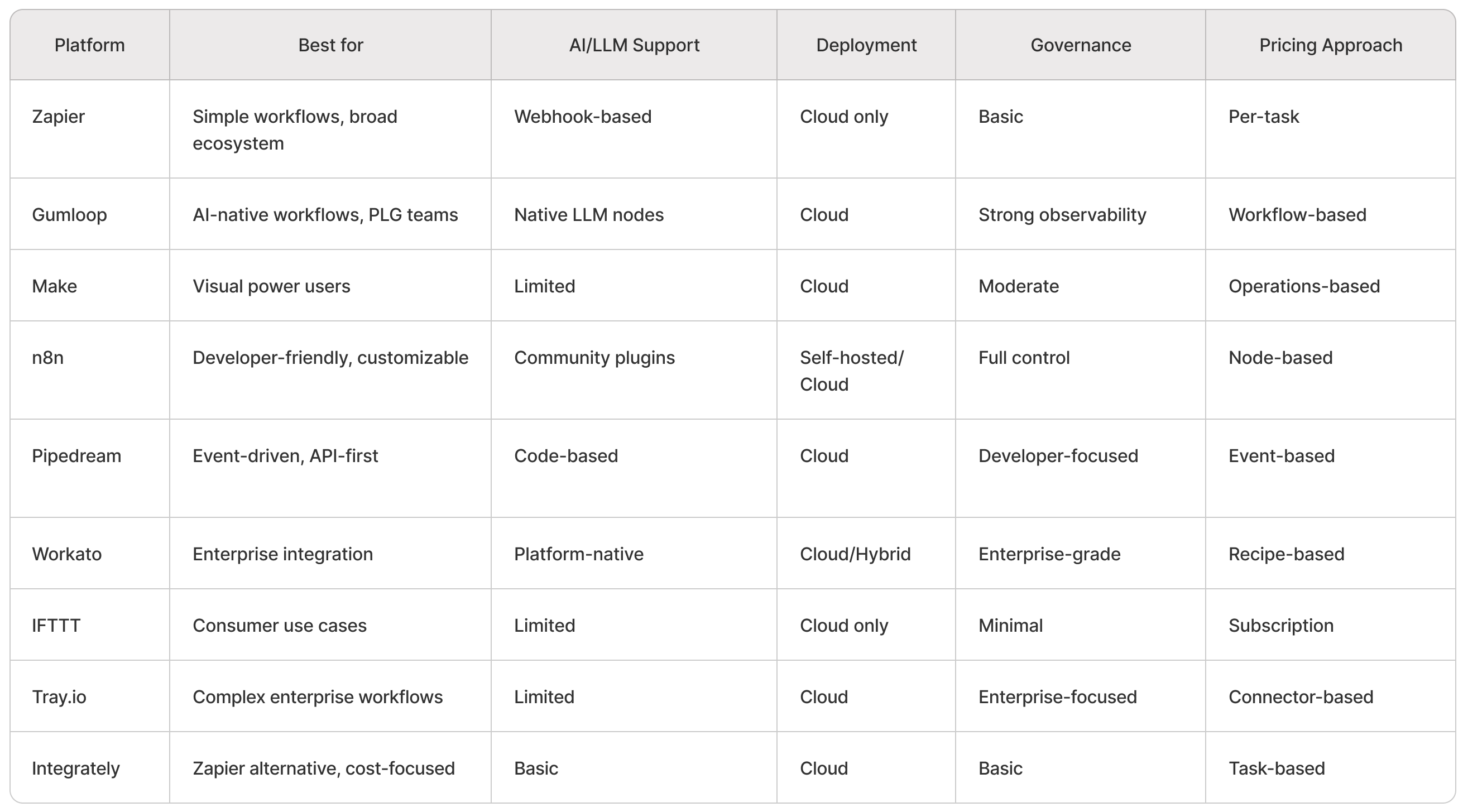
This comparison reveals clear segmentation. Consumer-focused tools like IFTTT aren't serious options for scaling businesses. Enterprise platforms like Workato and Tray excel in large organizations but are often overkill for startup and scale-up teams. The interesting middle ground — platforms designed for modern, growing tech companies — includes Gumloop, Make, n8n, and Pipedream, each with different strengths.
Why is Gumloop a strong Zapier alternative for product-led teams?
What Gumloop is and how it differs from classic no-code automation
Gumloop positions itself as an AI-native automation platform built for teams that need workflows to be intelligent, not just connected. Where traditional platforms treat AI as an add-on capability accessed through webhooks, Gumloop provides native LLM nodes that handle prompt engineering, response parsing, and error handling automatically.
The platform's architecture reflects this focus. Instead of the trigger-action paradigm that dominates older tools, Gumloop thinks in terms of intelligent workflows that can make decisions, process unstructured data, and adapt behavior based on context. This isn't just marketing positioning — it shows up in the interface design, the available node types, and the kinds of templates the platform provides.
For product-led teams specifically, Gumloop understands that automation increasingly needs to bridge structured data (from CRMs and analytics tools) with unstructured insights (from user feedback, support tickets, and behavioral analysis). The platform makes it easy to build workflows that can, for example, analyze customer interview transcripts, extract product insights, and route findings to appropriate team members based on topic and priority.
AI-native workflows: using LLMs as first-class nodes, not bolt-on steps
The practical difference is significant. In Zapier, calling an LLM API means setting up webhook actions, manually formatting JSON payloads, handling authentication, and parsing responses. It's technically possible, but it feels awkward and requires technical knowledge that defeats the purpose of no-code automation.
Gumloop provides dedicated LLM nodes for major providers — OpenAI, Anthropic, and others — with built-in prompt templates, parameter tuning, and response handling. Building a workflow that processes customer feedback through sentiment analysis and topic extraction becomes as straightforward as adding a filter step in a traditional automation platform.
More importantly, Gumloop handles the operational complexity that comes with AI-powered workflows. LLM APIs can be slow and occasionally fail, which breaks traditional automation assumptions about quick, reliable steps. The platform includes retry logic, timeout handling, and fallback options that keep workflows running even when AI services hiccup.
Observability, debugging, and collaboration for non-engineering teams
One of Gumloop's strongest differentiation points is treating automation as team infrastructure rather than individual projects. The platform includes workflow documentation features, commenting systems, and permission controls that make it easier for teams to build and maintain automation collectively.
The debugging experience is particularly strong. When workflows fail, Gumloop provides detailed execution logs that show intermediate data states, timing information, and clear error messages. You can step through workflow execution visually, inspect data transformations at each node, and quickly identify where problems occurred. This level of observability is crucial when workflows involve AI steps that might behave unpredictably.
Version control and testing capabilities support safer workflow development. Teams can create staging versions of workflows, test changes with sample data, and deploy updates with rollback options. These features matter most when automation becomes critical enough that breaking it would impact business operations.
Example Gumloop workflows for SaaS
Product-qualified lead routing and enrichment: When a user hits specific engagement thresholds in your product, trigger a workflow that enriches their company data using multiple APIs, scores fit using a custom prompt, and routes qualified leads to sales with contextualized talking points. The AI component handles unstructured data from company websites and social profiles to generate personalized outreach suggestions.
Churn-risk alerts combining product and billing data: Monitor multiple data sources — product usage patterns, billing events, support ticket volume — and use AI to analyze whether changes indicate churn risk or natural usage fluctuations. Generate risk scores with explanations, and trigger different intervention workflows based on customer segment and risk factors.
AI-assisted customer research and ticket triage: Process incoming support tickets and user feedback through LLM analysis to extract sentiment, identify bug reports vs feature requests, and route issues to appropriate teams. Use AI to generate initial response suggestions for common issues, and escalate complex cases with context summaries for human agents.
These workflows showcase Gumloop's strength in scenarios where automation needs to be intelligent, not just connected. They combine structured data processing with unstructured analysis in ways that would be complex and fragile in traditional automation platforms.
When to choose Gumloop over Zapier — and when to run them side by side
Gumloop makes the most sense for teams whose automation needs center around AI-enhanced workflows, complex data processing, or scenarios where observability and collaboration matter. If your workflows regularly involve analyzing text, making nuanced routing decisions, or combining data from multiple sources to generate insights, Gumloop's AI-native approach provides clear advantages.
The platform is particularly strong for product-led teams that need automation to understand user behavior, not just react to simple triggers. Customer success, product, and growth teams often find Gumloop's capabilities align well with their workflow complexity.
However, Gumloop's ecosystem is still developing compared to Zapier's massive integration library. For workflows involving niche tools or simple, stable connections between mainstream apps, Zapier might remain the pragmatic choice. Some teams run both platforms — Zapier for straightforward integration tasks, Gumloop for intelligent workflows that require AI capabilities.
The decision often comes down to where your automation complexity lives. If most of your workflows are simple trigger-action pairs, Zapier's maturity and ecosystem probably outweigh Gumloop's advanced features. If your workflows increasingly need to make decisions, process unstructured data, or adapt behavior based on context, Gumloop's architecture provides a cleaner foundation for that complexity.
How do other leading Zapier alternatives compare (Make, n8n, Pipedream, Workato, and more)?
Make (Integromat): visual power-user workflows with a learning curve
Make positions itself as the visual automation platform for users who've outgrown simple trigger-action workflows but aren't ready for full development environments. Its interface uses a flowchart-style visual editor that makes complex, branching workflows easier to understand and debug than Zapier's linear step approach.
The platform excels at scenarios involving conditional logic, loops, and data transformation. Teams building workflows that need to process arrays of data, handle multiple outcome branches, or perform complex field mapping often find Make's visual approach clearer than text-based alternatives. The error handling and retry capabilities are more sophisticated than Zapier's, which matters for workflows processing large data volumes.
Make's integration ecosystem is strong but not quite as comprehensive as Zapier's. The platform focuses on quality over quantity, with integrations that tend to expose more API functionality rather than just covering basic use cases. For teams that need deep integration with specific tools, Make often provides more options and flexibility.
The main drawbacks are learning curve and cost structure. Make's interface is more powerful but also more complex than Zapier's. New users often struggle with concepts like iterators, aggregators, and routers that don't exist in simpler platforms. The pricing model, based on operations rather than tasks, can be more cost-effective for complex workflows but harder to predict.
n8n: open-source flexibility for engineering-heavy teams
n8n takes a different approach entirely, offering an open-source automation platform that teams can self-host and customize extensively. For organizations with strong technical capabilities and specific security or compliance requirements, this flexibility is valuable.
The platform combines visual workflow building with the ability to write custom JavaScript for complex operations. This hybrid approach works well for teams that want the accessibility of no-code tools but need the power to implement custom logic when necessary. The node ecosystem includes community-contributed integrations that often surface capabilities not available in commercial platforms.
Self-hosting provides control over data processing, execution environments, and integration with internal systems. Teams can modify n8n's source code, build custom nodes for proprietary tools, and integrate workflows directly with their existing infrastructure. For companies handling sensitive data or operating in regulated industries, this control can be crucial.
The trade-offs are operational complexity and support responsibility. Self-hosted n8n requires infrastructure management, security updates, and troubleshooting that commercial platforms handle automatically. While n8n offers cloud hosting, teams choosing this route lose many of the open-source advantages while still accepting a less mature ecosystem than established commercial alternatives.
Pipedream: developer-first integrations and event workflows
Pipedream bridges automation platforms and development frameworks, providing a code-friendly environment for building event-driven workflows. The platform shines in scenarios where automation needs to handle webhooks, process API responses, or integrate with systems that don't have pre-built connectors.
The development experience is genuinely strong. Pipedream provides a code editor with syntax highlighting, debugging tools, and package management that makes writing custom integration logic straightforward. The platform handles infrastructure concerns like scaling, monitoring, and deployment while giving developers full control over workflow logic.
Event handling is particularly sophisticated. Pipedream can consume webhooks, process event streams, and trigger workflows based on complex conditions that would be difficult to implement in traditional automation platforms. For teams building product-led growth workflows that react to user behavior in real-time, this event-driven architecture provides advantages over polling-based alternatives.
The platform works best for teams with development resources who need automation capabilities that go beyond what visual platforms provide. The learning curve is steeper than pure no-code alternatives, but the flexibility and power are significantly greater. Teams often use Pipedream for complex, custom workflows while maintaining simpler tools for straightforward automation tasks.
Workato and Tray: enterprise iPaaS for complex org charts
Both Workato and Tray.io target enterprise integration scenarios that go beyond typical startup automation needs. These platforms excel at connecting legacy systems, handling complex data transformations, and providing the governance, security, and compliance capabilities that large organizations require.
Workato's strength lies in its pre-built connectors for enterprise software and its recipe-based approach to workflow sharing. The platform includes sophisticated error handling, monitoring, and alerting capabilities designed for mission-critical integration scenarios. The security and compliance features meet enterprise standards, with detailed audit logs, role-based access control, and data governance capabilities.
Tray.io focuses on visual workflow building for complex integration projects. The platform provides powerful data transformation capabilities and handles high-volume, batch processing scenarios well. The connector ecosystem emphasizes enterprise tools and includes deep integration capabilities that expose advanced API functionality.
Both platforms are overkill for most startup and scale-up scenarios. The pricing models assume enterprise budgets, the interfaces optimize for power over simplicity, and the feature sets address organizational complexity that smaller teams don't face. However, for companies planning eventual enterprise sales or operating in regulated industries, these platforms provide capabilities that simpler alternatives can't match.
IFTTT and simple tools: fine for consumers, not for scaling teams
IFTTT represents the consumer end of the automation spectrum. The platform excels at simple, personal automation tasks but lacks the reliability, observability, and collaboration features that business teams need. The integration ecosystem focuses on consumer apps and IoT devices rather than business software.
While IFTTT's simplicity is appealing, the platform's limitations become apparent quickly in business contexts. There's no meaningful error handling, limited data transformation capabilities, and no team management features. Workflows that break often fail silently, which is acceptable for personal convenience automation but problematic for business-critical processes.
Other simple automation tools like Microsoft Power Automate (for Office 365-heavy organizations) or Google Apps Script (for Google Workspace teams) can work for specific niches but generally lack the breadth and sophistication needed for comprehensive automation strategies. They're worth considering for teams deeply embedded in specific ecosystems but not as primary automation platforms.
Where these tools still beat Gumloop or Zapier for specific niches
Each platform has scenarios where it's genuinely the best choice. Make wins for teams that need visual workflow debugging and complex conditional logic without writing code. n8n wins for teams with strong technical capabilities who need complete control over their automation infrastructure. Pipedream wins for developer-friendly teams building event-driven workflows with custom logic.
Enterprise platforms like Workato and Tray win for large organizations with complex security requirements and legacy system integration needs. Even simple tools have their place — IFTTT remains excellent for personal productivity automation that doesn't need business-grade reliability.
The key insight is that the "best" platform depends entirely on team capabilities, technical requirements, and organizational context. Teams making platform decisions should map their specific needs against platform strengths rather than assuming any single tool will handle all automation scenarios optimally.
How do you choose the right Zapier alternative for your stage and stack?
A simple decision matrix: solo builder, early-stage startup, scaling PLG SaaS, enterprise
Solo builders and bootstrapped startups should prioritize cost, ease of use, and breadth of integrations. Zapier often remains the pragmatic choice unless AI-native workflows are central to the business model. Integrately or Make might provide cost savings for high-volume automation, but only if the learning curve doesn't consume too much time.
Early-stage funded startups can afford to invest in more sophisticated platforms if automation provides competitive advantages. This is where Gumloop becomes attractive — the AI-native capabilities and better observability justify the platform learning investment if workflows involve customer intelligence, product analytics, or growth automation that benefits from smart data processing.
Scaling product-led SaaS companies typically need platforms that handle team collaboration, provide good observability, and support complex workflows involving multiple data sources. Gumloop, Make, or Pipedream often provide better foundations than Zapier for the kinds of user behavior analysis, churn prevention, and product-qualified lead workflows that PLG companies depend on.
Enterprise and regulated environments require platforms with strong governance, security, and compliance capabilities. Workato, Tray, or self-hosted n8n become necessary when audit logs, role-based access control, and data residency requirements outweigh other considerations.
Evaluating total cost of ownership, not just subscription price
Subscription pricing is just the starting point for TCO analysis. Consider the operational costs of platform migration, team training, and workflow rebuilding. Factor in the ongoing costs of maintenance, debugging, and knowledge transfer as team members change roles.
More subtly, consider the opportunity costs of platform limitations. If your current platform requires complex workarounds for workflows you need, calculate the time cost of building and maintaining those workarounds versus moving to a platform with native capabilities. Teams often underestimate how much time they spend fighting platform limitations.
Also consider scaling costs. Zapier's per-task pricing can become expensive for high-volume workflows, while platforms with different pricing models might provide better unit economics as usage grows. Conversely, platforms with higher base costs might not make sense for teams with simple, low-volume automation needs.
Questions to ask vendors about AI roadmap, security, and extensibility
AI capabilities: How does the platform handle LLM integration natively? What's the roadmap for supporting new AI providers and capabilities? How does pricing work for AI-enhanced workflows, and how does the platform handle the latency and reliability challenges that come with AI dependencies?
Security and governance: What audit and compliance capabilities does the platform provide? How are secrets and credentials managed? What role-based access controls are available, and how granular are they? How does the platform handle data residency and privacy requirements?
Extensibility and integration: How does the platform handle custom integrations with internal tools? What's the process for building custom connectors or extending existing ones? How does the platform integrate with data warehouses, analytics tools, and other infrastructure components?
Observability and debugging: What monitoring and alerting capabilities are provided? How detailed are execution logs, and how long are they retained? What debugging tools are available when workflows fail, and how easy is it to test changes safely?
Signals that you should standardize on Gumloop (or a similar class of tool)
Several indicators suggest that AI-native platforms like Gumloop provide better foundations than traditional automation tools:
Your workflows increasingly need to process unstructured data — customer feedback, support tickets, sales notes, user interviews — and extract actionable insights. Traditional platforms handle this through awkward webhook chains, while AI-native platforms treat text analysis as a core capability.
You're building workflows that need to make nuanced decisions based on multiple data sources and contextual factors. Simple trigger-action automation gives way to intelligent routing, scoring, and personalization that benefits from AI-powered analysis.
Your team struggles with debugging and maintaining complex workflows built in traditional platforms. The observability and collaboration features in modern platforms like Gumloop reduce the operational burden of automation as it becomes more critical to business operations.
You're planning automation workflows that will be maintained and modified by multiple team members over time. Platforms designed for team collaboration reduce the knowledge silos and technical debt that accumulate with individual-focused automation tools.
Teams in The Program often standardize on platforms like Gumloop as part of a broader PLG stack redesign. If you want to stress-test your own automation strategy, you can book a call to walk through your workflows and options.
What does a low-risk migration from Zapier look like in practice?
Inventorying and classifying your existing Zaps by business criticality
Start with a complete audit of your current automation. Export your Zapier workflow list and classify each Zap by business impact and technical complexity. Critical workflows that directly affect revenue, customer experience, or core operations need the most careful migration planning. Simple, stable workflows that rarely break might be candidates for leaving in place.
Create three categories: Mission-Critical (business breaks if these fail), Important (operations degrade but business continues), and Nice-to-Have (convenience automations that save time but aren't essential). This classification determines migration priority and acceptable risk levels for each workflow.
Document the data flow and dependencies for critical workflows. Map out what systems they touch, what data they transform, and what downstream processes depend on their outputs. This documentation becomes crucial for testing equivalent workflows on new platforms and ensuring nothing breaks during cutover.
Choosing "beachhead" workflows to rebuild in Gumloop (or another alternative)
Select initial migration candidates based on potential improvement, not just ease of porting. Look for workflows that are currently complex or fragile in Zapier but would be simpler and more reliable on a platform designed for their requirements.
AI-enhanced workflows make excellent beachhead candidates for Gumloop migration. If you're currently using Zapier webhooks to call LLM APIs for content analysis, lead scoring, or automated responses, these workflows will be simpler and more maintainable with native AI capabilities.
Data transformation workflows also benefit from migration. Processes that involve complex field mapping, conditional logic, or multi-step data enrichment often become clearer and more debuggable on platforms with better observability and data handling capabilities.
Avoid starting with your most critical workflows unless they're actively causing problems. Begin with important but non-essential automation to build confidence with the new platform and identify any unexpected migration challenges before tackling mission-critical processes.
Running in parallel, testing, and de-risking cutover
Never switch platforms by immediately turning off existing workflows. Build equivalent processes on the new platform and run them in parallel with your existing automation, initially with outputs going to test environments or separate data stores.
Compare outputs systematically. For data transformation workflows, verify that the new platform produces identical results for the same inputs. For notification and routing workflows, ensure that the new system triggers the same actions under the same conditions. Document any differences and determine whether they represent improvements, acceptable variations, or problems that need addressing.
Implement gradual cutover for non-critical components first. Start by routing a small percentage of traffic through the new workflows, monitoring for errors or unexpected behavior. Gradually increase the percentage while maintaining the ability to quickly route everything back to the original system if problems arise.
Plan rollback procedures before making any changes. Know exactly how to disable new workflows, re-enable old ones, and handle any data inconsistencies that might arise during cutover. Test these rollback procedures during your parallel running phase to ensure they work under pressure.
Teaching non-technical teams to think in terms of workflows, not Zaps
Platform migration provides an opportunity to improve how teams think about automation more broadly. Help team members understand workflows as business processes rather than technical configurations. Focus training on mapping business requirements to automation capabilities rather than specific platform mechanics.
Introduce workflow documentation and ownership practices. Assign clear ownership for different automation areas, establish change management processes, and create documentation standards that make workflows maintainable by multiple team members. These practices matter more than platform choice for long-term automation success.
Encourage teams to think about automation observability and error handling proactively. Help them understand what should happen when workflows fail, how to monitor for problems, and how to design processes that degrade gracefully rather than breaking completely. This operational mindset becomes increasingly important as automation becomes more central to business operations.
How can you future-proof your automation stack beyond 2026?
Designing around events and data contracts, not individual app integrations
The most resilient automation strategies treat individual app integrations as implementation details rather than architectural foundations. Design workflows around business events — lead qualification, churn risk detection, product engagement milestones — rather than specific tool triggers. This approach makes it easier to change tools without rebuilding entire automation workflows.
Establish clear data contracts between systems. Define standard schemas for key business entities like leads, customers, and product events. When workflows operate on standardized data structures, changing the source systems or automation platforms becomes less disruptive. This is particularly important for teams using modern AI-native tools that compound over time rather than simple point-to-point integrations.
Consider automation as part of your broader data architecture. Workflows that integrate cleanly with data warehouses, analytics platforms, and other infrastructure components are more maintainable and provide better observability than isolated integrations. Design automation to enhance your data strategy rather than working around it.
Building an internal "automation culture" with ownership and standards
Sustainable automation requires organizational practices, not just technical platforms. Establish clear ownership models for different workflow categories — who builds them, who maintains them, who gets notified when they break. Avoid the common pattern where automation becomes informal and unowned until it breaks something important.
Create automation standards that promote maintainability and collaboration. Establish naming conventions, documentation requirements, and review processes for new workflows. These practices matter more as automation volume grows and team members change roles. The goal is making automation a team capability rather than individual tribal knowledge.
Implement change management processes that balance agility with stability. Teams need the ability to iterate on workflows quickly, but they also need protection against changes that break critical business processes. Staging environments, approval workflows, and rollback procedures become essential as automation becomes more central to operations.
Why choosing an AI-native platform now compounds over the next three years
AI capabilities in automation are moving from nice-to-have to essential faster than most teams realize. Workflows that can intelligently process unstructured data, make nuanced routing decisions, and adapt behavior based on context provide increasing competitive advantages. Teams building on platforms without native AI capabilities will face growing technical debt as they work around limitations.
The compounding effect comes from workflow complexity. Simple AI-enhanced processes — like using LLMs for lead scoring or content analysis — enable more sophisticated workflows that combine multiple AI capabilities. Teams starting with AI-native platforms build organizational capabilities and workflow complexity that become harder to replicate on platforms where AI is an afterthought.
Consider AI integration as infrastructure, not individual features. Platforms that handle LLM reliability, cost optimization, and prompt engineering systematically provide better foundations for AI-enhanced workflows than platforms where each AI integration requires custom implementation and maintenance.
Where Gumloop fits as a long-term automation and AI workflow layer
Gumloop's positioning as an AI-native automation platform makes it well-aligned with the direction automation is heading. The platform's architecture treats intelligent data processing, decision-making, and workflow adaptation as core capabilities rather than add-ons. This approach provides better foundations for the kinds of workflows that will matter most over the next several years.
The platform's focus on observability and team collaboration also addresses the operational challenges that become more important as automation scales. Teams need platforms that support debugging, change management, and knowledge sharing as workflows become more complex and critical to business operations.
However, no single platform will handle all automation needs perfectly. The most successful long-term strategies often involve using AI-native platforms like Gumloop for intelligent workflows while maintaining other tools for specific niches where they excel. The key is choosing platforms that integrate well with each other and with your broader technology stack.
What's the next step if you're considering moving off Zapier?
Quick diagnostic: are you a Zapier-heavy team that needs a new foundation?
Several indicators suggest you've outgrown Zapier's architecture and would benefit from a more modern automation platform. If your monthly Zapier costs exceed $200-300 and continue growing, you're likely running workflows complex enough to justify platforms with better unit economics for sophisticated automation.
Teams struggling with workflow reliability, debugging, or maintenance are good candidates for platforms with better observability and collaboration features. If you regularly spend time figuring out why workflows broke or trying to modify automation that only one person understands, better platforms can reduce this operational overhead significantly.
Organizations building workflows that need AI capabilities, complex data transformation, or real-time event processing will find their requirements align better with modern platforms designed for these use cases. If you're working around Zapier's limitations more than leveraging its strengths, migration likely makes sense.
How to pilot Gumloop with one critical workflow
Choose a pilot workflow that showcases Gumloop's strengths while being important enough to justify the learning investment. AI-enhanced lead scoring, customer feedback analysis, or churn risk detection workflows demonstrate the platform's AI-native capabilities while solving real business problems.
Start by rebuilding the workflow on Gumloop without changing your existing Zapier version. Run both workflows in parallel, comparing outputs and monitoring for any differences. This approach lets you evaluate the platform's capabilities and reliability without risking existing business processes.
Focus the pilot on workflows where Gumloop's advantages are most apparent. If your current process involves multiple Zapier steps to achieve what could be a single AI-enhanced workflow on Gumloop, the migration provides clear value beyond just platform switching. Document time savings, improved reliability, or enhanced capabilities to build the case for broader adoption.
When to involve leadership, security, and data teams in the decision
Automation platform decisions increasingly require cross-functional input as workflows become more central to business operations. Involve leadership when automation costs represent significant budget items or when workflow reliability directly affects revenue or customer experience. The decision stops being purely operational when the stakes get high enough.
Security team involvement becomes important when workflows process sensitive data, integrate with core business systems, or operate in regulated environments. Automation platforms handle API credentials, customer data, and system access in ways that require security review and approval.
Data teams should evaluate how automation platforms integrate with existing data architecture. Workflows that enhance or conflict with data governance, warehouse integration, or analytics workflows need data team input to ensure consistency and avoid architectural conflicts.
If this feels like a pivotal decision for the next three years of your product, you're the kind of team we work with in The Program — where we help you design the narrative, stack, and go-to-market that makes your automation an advantage, not a liability.
Not ready for a full engagement? Book a call and we'll pressure-test whether moving off Zapier — and toward tools like Gumloop — makes sense for your stage.
Conclusion
The automation landscape has fundamentally shifted since Zapier's early days. While Zapier solved the 2015 problem of connecting apps without engineering resources, today's teams need platforms designed for AI-native workflows, team collaboration, and the observability that comes with business-critical automation.
The choice between staying with Zapier and migrating to alternatives like Gumloop isn't just about features — it's about which foundation will serve your team best over the next three years. Teams building competitive advantages through intelligent automation, AI-enhanced workflows, and sophisticated data processing are finding that platforms designed for these requirements provide clearer paths forward than retrofitting older tools.
The migration decision comes down to alignment between your automation needs and platform capabilities. If your workflows are simple, stable, and well-served by Zapier's ecosystem, the switching costs probably aren't justified. If you're building complex, AI-enhanced processes that are central to your business operations, platforms like Gumloop offer architectural advantages that compound over time.
The key insight is treating automation platform choice as infrastructure decisions, not just tool selections. The platform you choose shapes what workflows are possible, how maintainable they are, and how they integrate with your broader technology strategy. Choose with the understanding that automation will become more, not less, central to your business operations over time.
For teams ready to move beyond Zapier's limitations, the options are stronger than they've ever been. AI-native platforms like Gumloop, developer-friendly tools like Pipedream, and visual power-user platforms like Make each provide clear advantages over traditional automation for different use cases. The challenge is matching your specific needs to the right platform strengths.
The automation decisions you make this year will determine whether your workflows become competitive advantages or technical debt. Choose platforms that align with where automation is heading, not just where it's been. Your future team will thank you