
Is Webflow Good for eCommerce? A Strategic Guide for Content-Led Brands

Get weekly strategy insights by our best humans

You're staring at two browser tabs. One has your Webflow marketing site—clean, custom, exactly how you want it. The other has a Shopify demo store—functional, feature-rich, generic. You need to add eCommerce. Do you extend Webflow and keep everything unified? Or do you accept the design compromise and let Shopify handle transactions?
This isn't a tools question. It's a strategy question.
Most eCommerce platform comparisons treat this like a feature audit: Does Platform X have abandoned cart recovery? Does Platform Y support multi-currency? But features don't matter if the platform doesn't align with how your business actually works. Webflow eCommerce is brilliant for specific business models and limiting for others. The question isn't "Is Webflow good for eCommerce?" It's "Is Webflow good for your eCommerce?"
Here's the strategic framework to figure that out.
What makes Webflow different as an eCommerce platform?
Visual design freedom vs. template-based constraints
Webflow's core differentiator isn't eCommerce-specific—it's the Designer. Unlike Shopify's theme-plus-customization model or WooCommerce's reliance on page builders, Webflow gives you pixel-level control over every element without writing code. You're not choosing from pre-built product card layouts. You're designing the product card from scratch.
This matters when your brand is your competitive advantage. If you're selling premium goods, creative services, or anything where the website needs to feel like an extension of the product itself, Webflow's design freedom is strategic leverage. Your product pages can look like editorial spreads. Your checkout can match your brand guidelines exactly. You're not fighting a theme's opinions about what an eCommerce site should look like.
But here's the trade-off: you're also not benefiting from years of conversion optimization baked into Shopify themes. Design freedom means design responsibility. If you don't have strong UX instincts or access to a designer who does, that freedom becomes a burden.
Unified CMS and commerce—why this matters for content-led brands
Webflow's real structural advantage is the CMS. You're not bolting eCommerce onto a content platform—you're running content and commerce in the same database, with the same design system, under the same information architecture.
Practically, this means your blog posts, case studies, product pages, and landing pages can reference each other seamlessly. You can build a product collection that pulls in related articles. You can create buying guides that dynamically link to products. You can structure your site so that content educates and commerce converts, all within one coherent experience.
This is the product-led content model in practice: content that exists to drive product understanding, not just traffic. If your acquisition strategy depends on SEO-driven editorial content that guides people toward purchases, Webflow's unified CMS is a structural advantage Shopify can't match without headless architecture.
Who Webflow eCommerce is built for (and who it's not)
Webflow eCommerce works for:
- Premium DTC brands where the site is part of the product experience (think Aesop, not Amazon)
- Service businesses adding physical products or digital goods (agencies selling templates, consultants selling courses)
- Content-first companies where eCommerce is secondary to editorial (media brands, creators, publishers)
- Brands with <500 SKUs and simple inventory needs
Webflow doesn't work for:
- High-volume catalogs (1,000+ SKUs with complex variants)
- Operational-first businesses optimizing for fulfillment speed over brand experience
- B2B commerce requiring custom pricing, bulk ordering, or quote workflows
- Anyone planning to scale to enterprise-level transaction volume
If your business model is "sell as many units as efficiently as possible," you need Shopify. If your business model is "sell a curated set of products to people who care about how they're presented," Webflow is worth considering.
How does Webflow eCommerce compare to Shopify?
Where Webflow wins: design control and content integration
Webflow's advantage is totality. You control the entire design system—typography, spacing, interactions, layout logic—without touching code. No theme lock-in. No "this element is hard-coded in the theme files" frustrations. If you can design it, you can build it.
The second advantage is content architecture. Shopify treats content (blog) and commerce (products) as separate systems. Webflow treats them as different content types in the same CMS. This makes strategies like entity-first SEO easier to execute—you can build topic clusters that span products, articles, and landing pages with consistent internal linking and schema markup.
For brands where the website itself is a marketing asset—not just a transaction interface—this structural difference is meaningful.
Where Shopify wins: feature depth and ecosystem maturity
Shopify has 6,000+ apps. Webflow has dozens of integrations. That gap represents operational maturity. Need advanced inventory management across multiple warehouses? Shopify has 20 apps for that. Need abandoned cart SMS campaigns? Shopify has native tools and third-party options. Need subscription billing, gift cards, customer accounts with order history, or multi-currency checkout? Shopify handles all of it out of the box.
Webflow's eCommerce feature set is functional but minimal:
- Basic inventory tracking (no multi-location support)
- Simple product variants (up to 3 option groups, limited combinations)
- Payment gateways: Stripe, PayPal, Apple Pay, Google Pay (no Klarna, Afterpay, or regional alternatives)
- No native abandoned cart recovery (requires Zapier + email tool)
- No customer accounts or order history dashboards
- No multi-currency (you can hack it with third-party tools, but it's not elegant)
If your business depends on these operational features, Webflow will frustrate you. You'll spend more time building workarounds than building your brand.
The real differentiator: creative strategy vs. operational scale
Shopify is optimized for volume. It's built for businesses that need to process thousands of orders efficiently, manage complex inventory, and integrate with fulfillment partners. The platform assumes eCommerce is your primary business model.
Webflow is optimized for experience. It's built for businesses where the website is a brand artifact, not just a checkout counter. The platform assumes eCommerce is part of a broader content ecosystem.
Neither is objectively better. They serve different strategies. The question is: which strategy is yours?
What are Webflow eCommerce's actual limitations?
SKU and variant complexity
Webflow supports up to 3 option groups per product (e.g., size, color, material) and a maximum of 1,000 SKU combinations per product. For most businesses, this is fine. For apparel brands with 5 sizes × 8 colors × 3 fits, you hit the ceiling fast.
The workaround is to split products into separate listings (e.g., "T-Shirt - Slim Fit" and "T-Shirt - Regular Fit" as different products), but this fragments your analytics, complicates inventory, and creates a worse UX. If your catalog is built on configurability—think furniture with 10+ finish options or tech products with modular accessories—Webflow's variant system will constrain you.
Inventory and order management
Webflow tracks inventory at the SKU level, but it doesn't support:
- Multi-location inventory (tracking stock across warehouses or retail locations)
- Inventory forecasting or low-stock alerts
- Advanced order workflows (partial fulfillment, backorders, pre-orders)
Order management is functional—you get a dashboard of orders, you can update fulfillment status, you can issue refunds—but it's not sophisticated. If you're shipping 500 orders a month, it's manageable. If you're shipping 5,000, you'll need a third-party order management system, which adds cost and complexity.
Payment and checkout constraints
Webflow's checkout is Stripe-powered and non-customizable. You can't change the layout, add trust badges, or A/B test checkout flows. You accept the checkout Webflow gives you.
Payment options are limited to Stripe, PayPal, Apple Pay, and Google Pay. No Klarna, Afterpay, Affirm, or regional payment methods. If your customer base expects buy-now-pay-later options, you'll lose conversions.
Multi-currency support doesn't exist natively. You can use apps like Weglot or custom JavaScript to display prices in different currencies, but checkout still processes in your base currency. For international brands, this is a deal-breaker.
Scalability ceiling—when you'll outgrow Webflow
Webflow eCommerce starts showing strain around:
- 1,000+ products (site performance degrades, CMS becomes unwieldy)
- 10,000+ orders per month (order management gets tedious, reporting is limited)
- Complex workflows (subscriptions, memberships, B2B pricing)
At that scale, you're either migrating to Shopify/BigCommerce or going headless (Webflow frontend + headless commerce backend like Commerce Layer or Swell). Both options are expensive and time-consuming. If you can predict you'll hit this scale within 18 months, start on a platform built for it.
What does Webflow eCommerce actually cost?
Subscription pricing breakdown
Webflow eCommerce has three plans:
- Standard ($42/month, billed annually): 500 items, 2% transaction fee, basic eCommerce features
- Plus ($84/month): 1,000 items, 0% transaction fees, advanced eCommerce features
- Advanced ($235/month): 3,000 items, 0% fees, API access, advanced features
The "2% transaction fee" on Standard means you're paying Webflow 2% of every sale on top of Stripe's ~2.9% + $0.30. On a $100 order, that's $5 to payment processing. The Plus plan eliminates Webflow's fee, making it the real starting point for serious stores.
Compare this to Shopify:
- Basic ($39/month): Unlimited products, 2.9% + 30¢ + 2% transaction fee (if not using Shopify Payments)
- Shopify ($105/month): Unlimited products, lower fees, better reporting
- Advanced ($399/month): Enterprise features, lowest fees
On paper, Webflow is cheaper. In practice, the cost parity depends on volume and tooling needs.
Hidden costs most people miss
Custom development: Webflow's design freedom assumes you have design and development skills (or budget to hire them). Building a high-converting Webflow store from scratch takes 40-80 hours of skilled work. At $100-150/hour, that's $4,000-12,000 upfront. Shopify themes start at $180 and require minimal customization.
Integrations: Webflow doesn't have an app store. Every integration runs through Zapier, custom code, or third-party embeds. If you need:
- Email marketing (Klaviyo, Mailchimp): $20-300/month
- Automation (Zapier): $20-50/month for basic workflows
- Reviews (Junip, Okendo): $15-100/month
- Analytics beyond Google Analytics: $50-200/month
Shopify's app ecosystem is more expensive per app, but apps are purpose-built for eCommerce. Webflow's integrations are more fragile and require more maintenance.
Migration costs: If you outgrow Webflow, migrating to Shopify costs $2,000-10,000 depending on catalog size and custom work. Factor this into long-term TCO if you're unsure about scale.
Total cost of ownership: Webflow vs. Shopify vs. WooCommerce
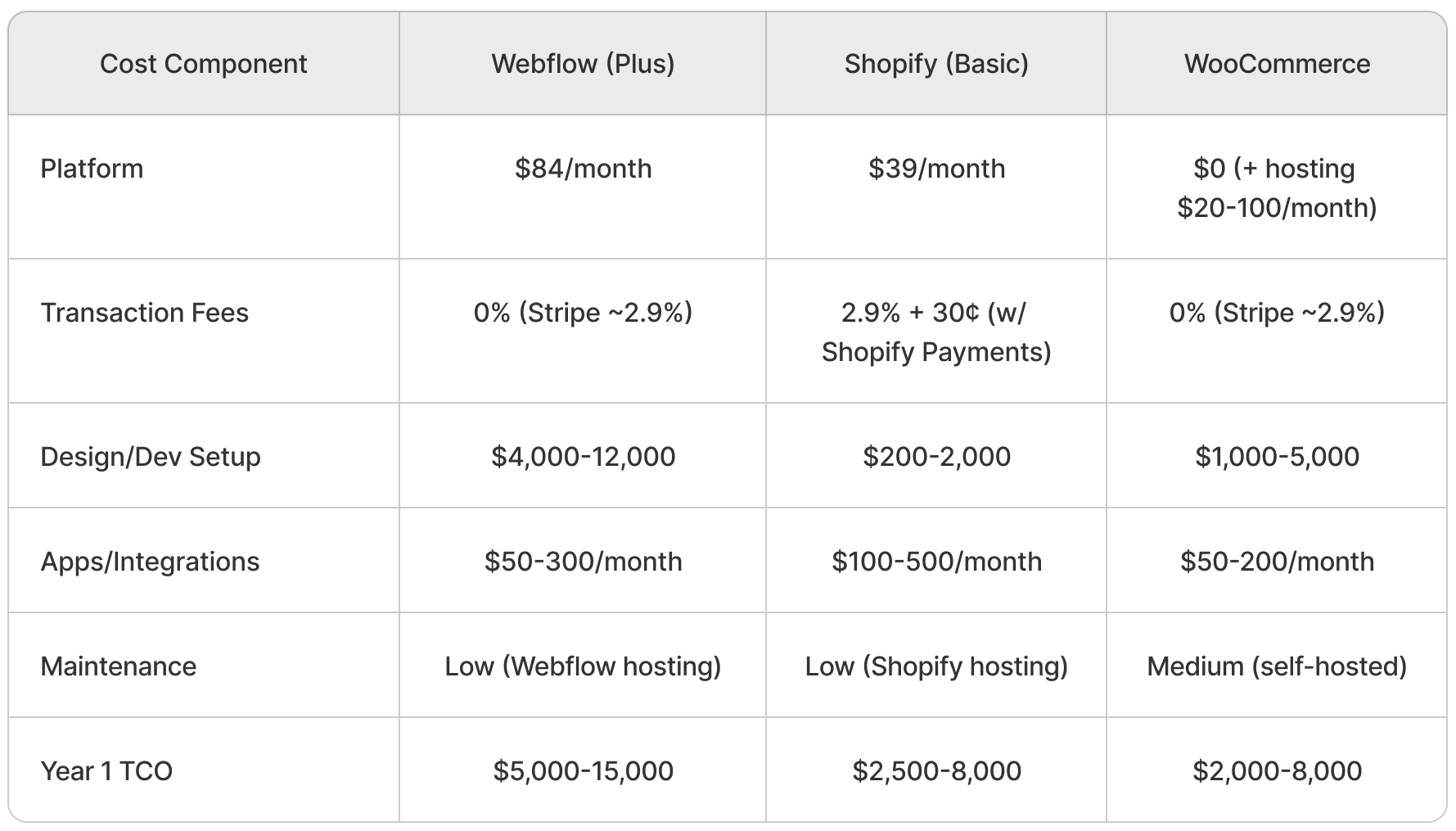
Webflow's TCO is highest in year one due to design costs, but comparable long-term if you don't need Shopify's app ecosystem. WooCommerce is cheapest on paper but most expensive in time and technical overhead.
When should you choose Webflow for eCommerce?
Scenario 1: You're already using Webflow and adding commerce
If your marketing site is in Webflow, adding eCommerce keeps everything unified. One CMS, one design system, one hosting environment. You're not managing DNS splits, brand consistency across platforms, or separate analytics setups.
The decision calculus: Is the operational simplicity worth Webflow's feature limitations? If you're selling <200 SKUs and don't need advanced inventory management, yes. If you're launching a 500-SKU catalog, probably not.
Scenario 2: Your brand is your competitive advantage
If you're competing on brand experience—not price, not selection, not convenience—Webflow's design control is strategic. Brands like Italic, Kotn, or Outdoor Voices could justify Webflow because the site itself communicates brand values. Commodity retailers can't.
Ask: Would a customer notice if your site looked like a Shopify template? If yes, you need Webflow-level control.
Scenario 3: You're selling experiences, not commodities
Webflow works well for:
- Courses, templates, digital products (low inventory complexity)
- Service + product hybrids (consulting + book, agency + templates)
- Limited-edition drops (scarcity-driven, not catalog-driven)
- High-ACV, low-volume products (luxury goods, custom furniture)
These models don't stress Webflow's inventory or order management limits. They benefit from its content-commerce integration.
Scenario 4: You need content and commerce tightly integrated
If your acquisition strategy is SEO-driven editorial content that guides people toward product understanding, Webflow's CMS architecture is a structural advantage. You can build:
- Buying guides that dynamically link to products
- Product collections organized by content themes
- Editorial hubs where articles, case studies, and products coexist
Shopify can do this with headless architecture, but that adds complexity and cost. Webflow does it natively.
When should you avoid Webflow for eCommerce?
You're managing 500+ SKUs with complex variants
At 500+ products, Webflow's CMS becomes slow to navigate. At 1,000+, it's genuinely unwieldy. If you're also managing complex variants (apparel with size/color/fit, configurable products with 10+ options), you'll spend more time fighting the CMS than using it.
Alternative: Shopify for straightforward catalogs, BigCommerce for complex B2C, or headless (Contentful + Commerce Layer) for ultimate control.
You need advanced B2B features
Webflow doesn't support:
- Customer-specific pricing
- Bulk order workflows
- Quote requests or manual invoicing
- Purchase orders or net payment terms
If you're selling to businesses, you need Shopify Plus (starting at $2,000/month), BigCommerce B2B, or a custom solution.
You're optimizing for operational efficiency over brand
If your competitive advantage is fast shipping, low prices, or vast selection—not brand experience—Shopify's operational features (inventory management, order routing, fulfillment integrations) are worth more than Webflow's design control.
Webflow is for businesses where the website is part of the value proposition. Shopify is for businesses where the website is just the transaction layer.
You plan to scale to enterprise volume
If you're projecting 10,000+ orders/month within 18 months, or planning international expansion with multi-currency and localized experiences, start with a platform built for that scale. Migrating later is expensive and disruptive.
Alternative: Shopify Plus, BigCommerce Enterprise, or headless commerce.
How do you set up Webflow eCommerce strategically?
Plan your content-commerce architecture first
Before you build anything, map your collections:
- Products (the core eCommerce collection)
- Product Categories (for navigation and filtering)
- Blog Posts (if content is part of your strategy)
- Landing Pages (for campaigns, seasonal content)
- Case Studies or Lookbooks (if relevant to your brand)
Design these collections to reference each other. A product should be able to link to related blog posts. A category page should pull in editorial content about that category. This is how you build topical authority and keep users engaged beyond the product page.
Design for conversion and content simultaneously
Your product pages need to do two things:
- Convert visitors who are ready to buy
- Educate visitors who are still researching
This means designing product pages that feel like editorial content—rich imagery, storytelling copy, contextual information—but with clear CTAs that don't disrupt the narrative.
Think about where CTAs belong. Not every section needs a "Buy Now" button. Some sections should deepen understanding. Some should build trust. The CTA comes when the visitor is ready, not when the template says so.
Integrate your GTM stack early
Don't add tools reactively. Build your stack upfront:
- Analytics: Google Analytics 4, with event tracking for add-to-cart, checkout initiation, purchase
- Email: Klaviyo or Mailchimp, integrated via Zapier
- Automation: Zapier workflows for order confirmations, abandoned cart emails, customer data syncing
- Reviews: Junip or Okendo (if needed)
Map these integrations before launch. Retrofitting analytics or email workflows after you're live is painful and leads to data gaps.
Build for SEO from day one
Webflow's SEO flexibility is a strength—use it:
- Add product schema markup to product pages (Webflow makes this easy with custom code embeds)
- Structure URLs hierarchically: /products/category/product-name
- Write unique meta titles and descriptions for every product (use dynamic fields in the CMS)
- Add alt text to all product images (accessibility and SEO)
- Build internal linking between products and content (e.g., blog post about "best running shoes" links to running shoe products)
SEO isn't a post-launch task. It's a structural decision.
What's the verdict—should you use Webflow for eCommerce?
The decision framework
Ask yourself these five questions:
1. Is design a core competitive advantage for your brand?
If your site needs to look and feel different from every other store in your category, Webflow's design freedom is strategic. If your site just needs to work, Shopify is fine.
2. Are you managing fewer than 500 SKUs?
If yes, Webflow's CMS can handle it. If no, you'll outgrow it fast.
3. Is content central to your acquisition strategy?
If you're building SEO-driven editorial content to drive product awareness, Webflow's unified CMS is a structural advantage. If you're buying ads and optimizing checkout, Shopify's operational features matter more.
4. Do you value creative control over plug-and-play features?
Webflow gives you control. Shopify gives you features. You can't have both without going headless (which is expensive).
5. Are you prepared to invest in custom development?
Webflow is not a template platform. You'll need design and development time (or budget) to build something good. If you don't have that, Shopify's theme ecosystem is more practical.
If you answered "yes" to questions 1, 2, 3, and 5, Webflow is worth serious consideration. If you answered "no" to most of them, Shopify is the safer bet.
The strategic play: Webflow for brand, headless for scale
There's a third option: use Webflow as your frontend and a headless commerce platform (like Commerce Layer, Swell, or Medusa) as your backend. This gives you Webflow's design control and content integration with enterprise-grade commerce features.
The trade-off is complexity. Headless setups require more technical skill, higher upfront costs ($20,000-50,000 to build), and ongoing maintenance. But if you need Webflow's brand experience and Shopify's operational power, headless is the only way to get both.
This is the path brands like Kotn and other design-forward DTC companies take when they outgrow traditional platforms. It's not for everyone, but it's worth knowing the option exists.
Webflow eCommerce isn't for everyone. It's for brands that treat their website as part of the product experience, not just the checkout interface. It's for businesses where content and commerce need to coexist in the same ecosystem. It's for founders and marketers who value creative control and are willing to trade some operational features for design freedom.
If that's you, Webflow is one of the best tools available. If it's not, Shopify will serve you better—and that's fine. The goal isn't to choose the "best" platform. The goal is to choose the platform that aligns with how your business actually works.
Platform choice is one decision in a larger system. If you're building a content-led, product-driven business, you need more than tools—you need a strategy that integrates content, SEO, product, and GTM into a unified engine. That's what The Program teaches: how to build systems that scale, not just campaigns that work once.
FAQs
Can Webflow handle high-traffic eCommerce sites?
Webflow's hosting infrastructure can handle significant traffic (tens of thousands of visitors per day), but performance degrades with large product catalogs (1,000+ items) or complex CMS queries. If you're expecting sustained high traffic with a large catalog, plan for CDN optimization and consider headless architecture for the commerce layer.
Does Webflow eCommerce work for subscription products?
Not natively. Webflow doesn't support recurring billing or subscription management. You'd need to integrate a third-party subscription platform (like MemberStack or Outseta) via custom code, which adds complexity and cost. If subscriptions are central to your business model, use Shopify (with subscription apps) or a dedicated subscription platform like Chargebee.
How hard is it to migrate from Webflow to Shopify later?
Moderately difficult. You'll need to export product data (Webflow provides CSV export), recreate your design in Shopify's theme system, set up payment and shipping configurations, and redirect URLs. Expect $2,000-10,000 in costs depending on catalog size and custom work. The bigger issue is design loss—you won't be able to replicate Webflow's design precision in Shopify without heavy custom theme development.
Can I use Webflow eCommerce for digital products?
Yes. Webflow supports digital product sales with automatic file delivery after purchase. This works well for templates, courses, ebooks, or downloadable assets. The limitation is product access management—there's no customer account dashboard, so customers receive download links via email but can't log in to re-download files later. For complex digital product businesses (memberships, course platforms), use a dedicated tool like Teachable or Podia.
Is Webflow eCommerce good for SEO?
Yes, with effort. Webflow gives you full control over meta tags, schema markup, URL structures, and on-page SEO elements. You can build strong internal linking between content and products, which is harder in Shopify. However, Webflow doesn't provide eCommerce-specific SEO features (like automatic product schema or built-in review markup)—you'll need to add these manually via custom code. If you're committed to content-driven SEO, Webflow's flexibility is an advantage. If you want plug-and-play SEO, Shopify's app ecosystem is easier.
Ready to build a commerce strategy that actually fits your business model? Get in touch and let's map your platform, content, and GTM strategy into a system that scales.